
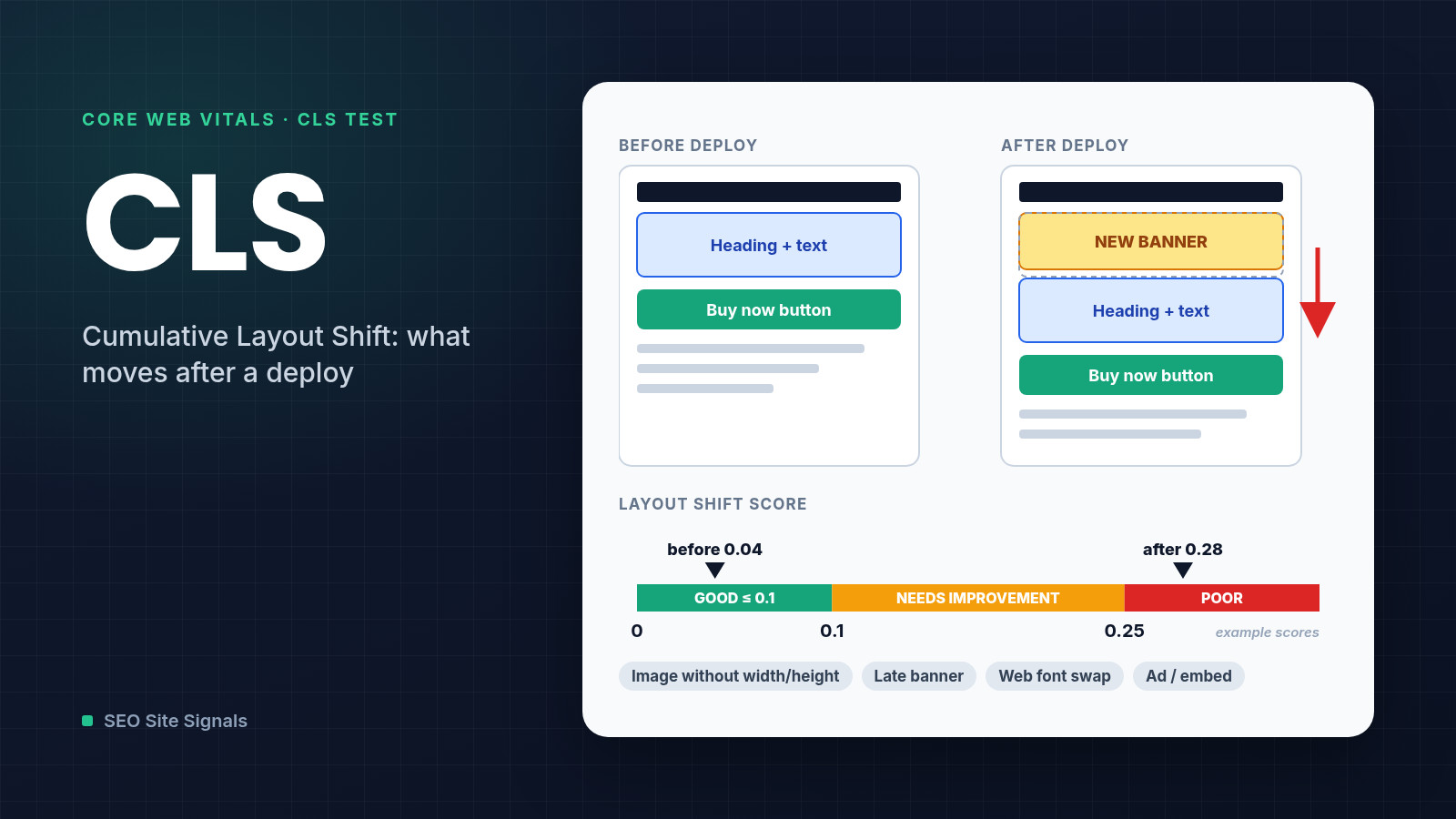
When cumulative layout shift gets worse after a deploy, the cause is almost always something the release added or changed above the fold: an image or embed without reserved space, a new web font, or a banner injected after the page painted. Google counts a CLS of 0.1 or less as good and anything above 0.25 as poor, measured at the 75th percentile of real visits. This guide shows how to find the element that moved and fix it before Search Console notices.
It is written for the person who shipped on Tuesday and watched the page jump on their phone on Wednesday, not for someone who wants another definition of Core Web Vitals.
What is cumulative layout shift, in plain terms?
Cumulative layout shift (CLS) measures how much visible content moves unexpectedly while someone uses a page. Every time an element that is already on screen changes its start position between two frames, the browser records a layout shift. CLS is the largest burst of those shifts during the page's life.
- Each shift gets a score: impact fraction × distance fraction. An element covering half the viewport that drops by a quarter of the screen height scores 0.75 × 0.25 = 0.1875, which is poor on its own.
- Shifts are grouped into session windows: shifts less than 1 second apart, with a 5-second cap on the window. CLS is the worst window, not the sum of every shift.
- Expected movement is excluded: shifts within 500 ms of a tap, click, or keypress are flagged as user-initiated and do not count. Scrolling does not count as input.
Two details matter after a deploy. A new element being added does not count as a shift unless it pushes existing content. And a page restored from the back/forward cache starts again at zero.
What actually shifts after a deploy?
After a deploy, layout shift almost always comes from content that arrives late and takes space nobody reserved for it. The release may not touch CSS at all. A new CMS block, a tag-manager change, or a font swap is enough. These are the usual suspects:
New hero or content block with an <img> or <video> missing width/height
What moves on the page: Everything below the image drops when the file loads
Fix: Add width and height attributes, or CSS aspect-ratio, so the browser reserves the box
New or changed web font
What moves on the page: Text reflows when the web font replaces the fallback, pushing buttons and paragraphs
Fix: Preload the critical font, use font-display: optional, or match the fallback's metrics with size-adjust
Cookie notice, promo bar, or "free shipping" strip added
What moves on the page: The whole page slides down when the bar appears at the top
Fix: Render it as an overlay (fixed position) or reserve its height in the initial HTML
Ad slot, review widget, map, or video embed added
What moves on the page: Content jumps when the iframe resizes itself
Fix: Give the container a min-height that matches the most common size
A/B test or personalization script
What moves on the page: The original headline or hero is replaced after first paint
Fix: Run the test server-side, or keep the variant the same size as the control
Client-rendered component (reviews, "related products," price block)
What moves on the page: A block appears between the heading and the content after data loads
Fix: Render a placeholder of the final size, or load it below the fold
New animation on a menu or banner
What moves on the page: Neighbors move because the animation changes top, height, or margins
Fix: Animate with transform instead of layout properties
One reason these slip through: they rarely show up on the developer's machine. Test images are cached, local API calls are instant, and third-party scripts behave differently in production. The shift only appears on a cold load over a real connection.
How do you find the element that is shifting?
Find the shifting element by testing the live URL on a cold load, then naming the node that moved. A score alone does not help the person who has to fix it. Work through these in order:
- Test the production URL, not staging. Run it through the Cumulative Layout Shift Test. It loads the page in headless Chrome, records every shift with the Layout Instability API, and ranks the elements by how much each contributed. Test the template that changed, such as a product page or a blog post, not only the home page.
- Compare with a URL the deploy did not touch. If both got worse, suspect something site-wide: a font, a header bar, or a tag-manager container. If only one template got worse, look at that template's new components.
- Reproduce it in Chrome DevTools. Record a page load in the Performance panel with network throttling on. Layout shifts appear on their own track. Selecting one highlights the element that moved.
- Log it in the console if you need proof. This snippet prints every shift and the nodes involved:
new PerformanceObserver((list) => { for (const entry of list.getEntries()) { if (!entry.hadRecentInput) { console.log(entry.value.toFixed(4), entry.sources.map(s => s.node)); } } }).observe({ type: 'layout-shift', buffered: true }); - Capture it from real users. The attribution build of Google's
web-vitalslibrary reports the largest shift's target element with each CLS value. Send that to analytics and you will see shifts that only happen on real devices.
Why does the lab test pass while Search Console says CLS is poor?
Lab tests only measure layout shifts during page load, while Search Console reports field data from real Chrome users across the whole visit. So a page can pass a lab CLS check and still fail in the field. Common reasons:
- Shifts after load. Lazy-loaded images further down the page, infinite scroll, and "load more" buttons that insert content above what the user is reading all happen after the lab test finishes.
- Device mix. A narrow phone screen wraps text differently, so a font swap that is harmless on desktop can move three lines on mobile. Google scores mobile and desktop separately.
- Timing. Field data is a rolling 28-day window. A fix you shipped yesterday will take weeks to fully show in the Core Web Vitals report.
Use the lab test to find and fix the cause, then watch the field numbers catch up. If the lab test finds nothing but field CLS is still poor, the shift is happening after load, and the web-vitals attribution data is where you will find it.
How do CLS fixes interact with LCP and FCP?
Most CLS fixes also help loading metrics, but a few can hurt them if you are careless. Reserving image dimensions costs nothing. But if you "fix" a font shift by hiding text until the web font arrives, first paint gets slower. And if you lazy-load the hero image to stop it shifting, your largest contentful paint gets worse.
The hero image is often the element behind both problems. If a new hero both moves the page and loads late, our walkthrough on finding the LCP element covers the loading side. If text is slow to appear at all, start with checking FCP before LCP. Fix the shift and the load time in separate tickets so you can see which change moved which number.
A short post-deploy CLS checklist
- Every new image, video, and iframe has width and height, or an
aspect-ratio. - Banners and consent notices overlay the page or have space reserved in the HTML.
- New fonts are preloaded and use
font-display: optionalor metric overrides. - Client-rendered blocks have a placeholder of their final size.
- Animations use
transform, nottop,left,height, or margins. - The changed template tests at 0.1 or less on a cold load, on both mobile and desktop.
Cumulative layout shift FAQ
What is a good CLS score?
A good CLS score is 0.1 or less, measured at the 75th percentile of page loads on mobile and desktop separately. Between 0.1 and 0.25 needs improvement, and above 0.25 is poor. Google's Core Web Vitals report in Search Console uses these thresholds for groups of similar URLs.
Does a cookie banner cause layout shift?
A cookie banner causes layout shift when it is inserted at the top of the page and pushes content down after first paint. A banner that overlays the page with fixed positioning, or has its space reserved in the initial HTML, does not shift existing content and does not add to CLS.
Why is my CLS different in PageSpeed Insights and Search Console?
PageSpeed Insights shows a lab run from a single page load plus field data for that URL when there is enough. Search Console shows field data grouped across similar URLs over 28 days. Lab tests miss shifts that happen after load, so field CLS is often higher.
Do layout shifts after a click count toward CLS?
No, not if they happen within 500 milliseconds of a discrete input such as a tap, click, or keypress. Those shifts are flagged as user-initiated and excluded. Scrolling is not treated as input, so content that jumps while someone scrolls still counts.
How long does it take for a CLS fix to show in Search Console?
Field data in Search Console covers a rolling 28-day window, so a CLS fix takes up to about four weeks to be fully reflected. You can start validation in the Core Web Vitals report after deploying, and use a lab test to confirm the fix straight away.
If you ship every week, check every week. A layout shift usually comes back with the next banner or widget, so a single test is not enough. The SEO Site Signals monitoring plans keep checking CLS and the other signals across your site, so a regression shows up without anyone remembering to run a test.
SEO Site Signals is the free-tool and monitoring product from PositionMySite, a North American software company in Toronto and Tampa. We have been building web software since 2009, and our own engineers build the checkers on this site, including the cumulative layout shift test in this article. The free versions exist so small teams can spot a regression without buying an enterprise performance suite first.
Last updated: September 25, 2026 | Author: David Dayan | Sources: web.dev, "Cumulative Layout Shift (CLS)"; web.dev, "Optimize Cumulative Layout Shift".