
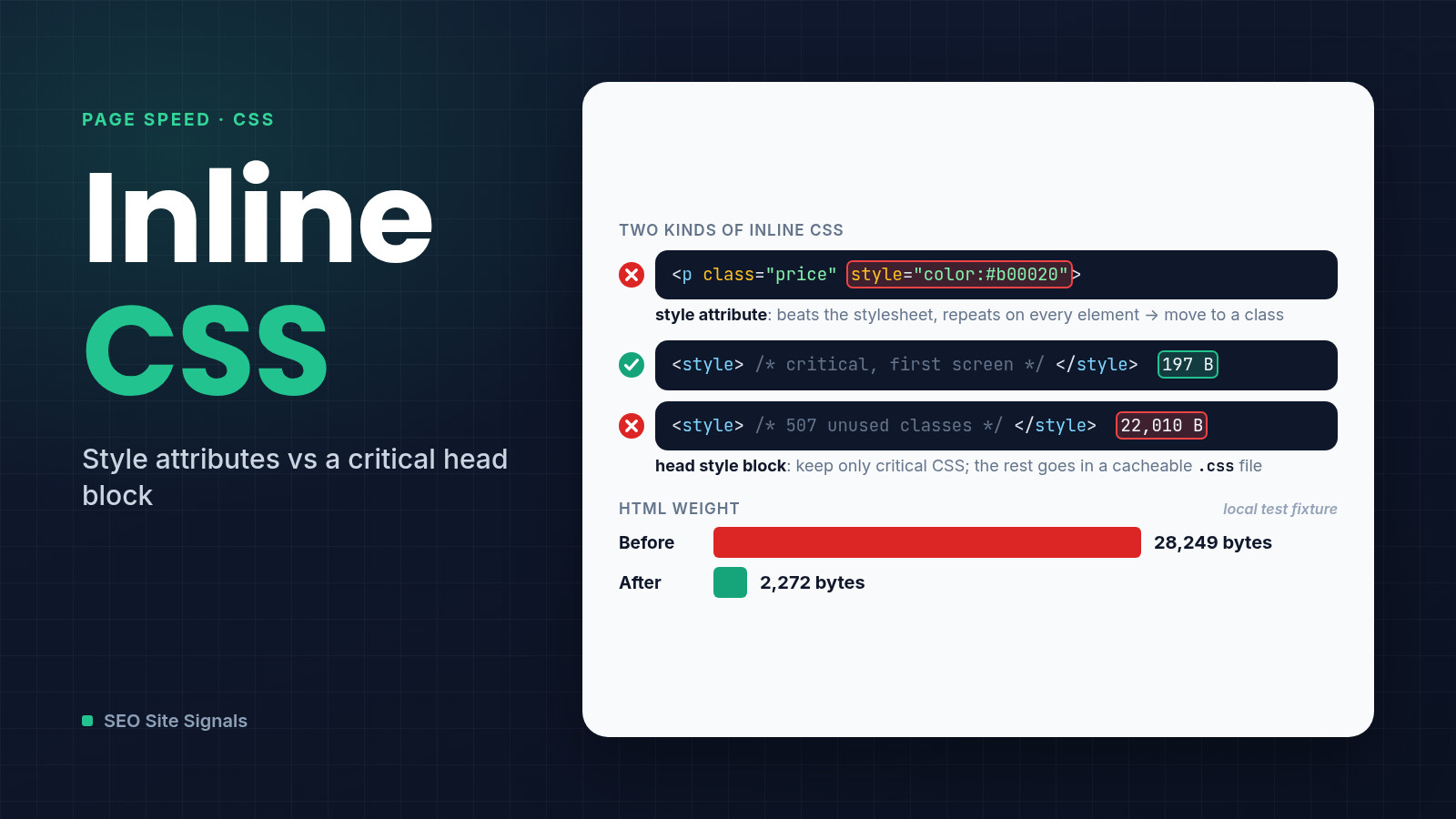
A style attribute and a style block in the head are both called inline CSS, and they are not the same fix. Keep the CSS the first screen needs in one small style element. Move repeated style attributes into classes, and do not paste a whole stylesheet into the HTML. Those bytes travel with every response, and a style attribute beats ordinary stylesheet rules. MDN says the attribute is for quick testing, and that styles normally belong in a separate file.
What is inline CSS?
Inline CSS is CSS written in the HTML instead of a cacheable stylesheet. Count two things separately: style attributes on elements, and style elements that hold rule sets. An external file is the third place a declaration can live, and it is the one a browser can reuse across URLs.
Style attribute
Where: the style attribute on one element
Example: style="color:#b00020;font-weight:700"
Cached on its own: no
Cascade: MDN treats it as specificity 1-0-0-0. It overrides normal author rules. A stylesheet needs !important to beat it.
Style element
Where: a style element, usually in the head
Example: a short block for the first screen
Cached on its own: no. It is part of the HTML.
Cascade: ordinary selectors. A class here still loses to a style attribute on the same property.
External stylesheet
Where: link rel="stylesheet"
Cached on its own: yes, when the response is cacheable
Cascade: ordinary selectors. It loses to a style attribute unless that declaration is !important.
Critical CSS belongs in the style element. Repeated visual rules belong in the stylesheet. A style attribute is usually a template that should have been a class.
When should CSS be inline?
web.dev uses “critical CSS” for the declarations that render the first viewport. Putting that slice in a style element removes a request before first paint. The rest should load without blocking, from a file the browser can cache. Inlining also adds bytes to HTML, which usually cannot be cached as long as a shared stylesheet.
Lighthouse says the same thing about a render-blocking file: inline what first paint needs, and defer the rest. That is not a reason to put a style attribute on every card. A blocking file is a different fault from HTML that already contains the CSS. The render-blocking resources test covers the file. This article covers CSS that is already in the document. Repeating a whole sheet in every response costs more than fetching that sheet once.
What did a local fixture measure?
These numbers are from two local HTML files, not a live crawl. On October 1, 2026, headless Chrome 154.0.8037.57 opened each file. We measured the UTF-8 size of each style element’s text, counted elements with a style attribute, and read getComputedStyle on the price and the heading. “Before” is a 24-card price list. “After” keeps the critical block, deletes the unused block, and uses classes.
Before, local fixture
Style attributes: 74
Attributes with !important: 1, on the button
Critical style block: 197 bytes, in the head
Second style block: 22,010 bytes, 507 unused classes, in the head
HTML file: 28,249 bytes
Computed price color: rgb(176, 0, 32), from the attribute
Computed price weight: 700, from the attribute
Computed h1 size: 32px, from the critical block
After, local fixture
Style attributes: 0
Critical style block: 197 bytes, in the head
Second style block: removed
HTML file: 2,272 bytes
External stylesheet: 194 bytes
Computed price color: rgb(17, 17, 17), from .price
Computed price weight: 400, because the class does not set it
Computed h1 size: 32px, still from the critical block
The class .price sets #111. Chrome computed rgb(17, 17, 17) after the edit, and rgb(176, 0, 32) before it, because the attribute won. The heading stayed 32px, so the 22,010-byte block was not styling the first screen. Weight fell from 700 to 400 because the class never set font-weight. Nothing used .u-0001 and the rest of that block. Deleting it, instead of moving it, cut the HTML from 28,249 bytes to 2,272. The card rules that were real went into the 194-byte file.
<p class="price" style="color:#b00020;font-weight:700">$9</p>

<p class="price">$9</p>
/* .price { color: #111; }
   font-weight was not copied, so it computed as 400. */
How do you find inline CSS on a live page?
Search the HTML, then see which of those bytes the first viewport uses. A page can have a sensible head block and still be full of style attributes, or the reverse.
- Search the response. Look for style= and for style elements. Twenty cards with the same attribute are one template. A style element larger than the first screen is a stylesheet pasted into the document.
- Open Coverage in Chrome DevTools. web.dev treats the green ranges as CSS the first view needed and the red ranges as the rest. Green rules are candidates for the head. Red rules should not be inlined.
- Re-check with the tool. The Inline CSS Test counts style attributes and the byte size of each style block in the head. It also flags inline styles that override an external sheet, and !important in inline CSS. It only fetches a public URL, which is why the fixture was measured in Chrome. On a deployed page, the checker and View Source should agree. If they do not, the server is not sending the file you edited.
How do you fix style attributes and a large style block?
Change the template that emits the markup. Cleaning one saved page will not survive the next publish. Then split the head block into what the first screen uses and everything else.
- Turn repeated attributes into one class. The fixture had 24 copies of the same article attribute, plus the same pattern on headings and prices: 74 attributes.
- Prefer a class for a one-off, too. MDN says the style attribute must not carry meaning. Hiding a block belongs on the hidden attribute, not style="display:none".
- Remove !important from the attribute. MDN says a stylesheet needs !important to override a normal style attribute, and that the flag is a poor way to win a cascade fight. The fixture’s button used it even though the class already set the same color.
- Cut the head block to the first viewport. web.dev points to Critical and Penthouse for that cut. Coverage is the manual version. The Inline CSS Test describes a typical critical block of about 5 to 15 KB and flags one over 20 KB. Those are checker lines, not a Google cutoff. This fixture needed 197 bytes.
- Load the rest as a file, and delete what nothing uses. web.dev preloads the file as style, then sets rel="stylesheet" on load, with a noscript fallback. If Content Security Policy blocks that inline handler, use a small external loader. Do not park dead rules in the file. A shared file can be cached. The HTML cannot.
- Read computed style again. The attribute count should drop. Color, size, and weight should match what you meant to keep. In the fixture, color moved and weight did not.
Inline CSS FAQ
Is inline CSS bad for SEO?
Not by itself. A small critical block is how web.dev lets the first screen paint without waiting on a file, which is the part of load time people feel. A style attribute does not keep a URL out of the index. The cost is heavier HTML, CSS that cannot be cached across pages, and rules the stylesheet no longer controls.
What is the difference between a style attribute and a style tag?
A style attribute sets properties on one element. MDN says those declarations override normal author rules and treats the attribute as specificity 1-0-0-0. A style element holds selectors, and a class in it still loses to a style attribute. Only the style element is a reasonable place for critical CSS.
How much CSS should I put in the head?
Only rules the first viewport uses. web.dev does not publish a byte cap. On the fixture, 197 bytes styled the body, heading, and wrapper, and 22,010 bytes changed nothing visible. The Inline CSS Test’s 5 to 15 KB note, and its flag above 20 KB, are checker warnings, not a Google cutoff.
Can a stylesheet override inline styles?
A normal rule cannot. MDN says inline styles overwrite normal author stylesheet declarations. The override is !important. If the attribute is also !important, delete it instead of escalating. In the fixture, .price said #111 and the attribute computed as rgb(176, 0, 32).
Does inlining the whole stylesheet help LCP?
Only the first-viewport slice can help, by removing a request before paint. Inlining the rest makes every HTML response carry bytes a cached file would store once. web.dev states that tradeoff. Delete unused rules, externalize shared ones, and keep the head block to what Coverage marked as used.
Count the attributes and the head blocks on a live URL: run the page through the Inline CSS Test after the template change. Treat a style block over 20 KB, or a long list of style attributes, as markup to edit before the next publish.
SEO Site Signals is the free-check and site-audit product from PositionMySite, a North American software company with offices in Toronto and Tampa. The company has built web software since 2009, including the checkers on this site. The Inline CSS Test is one of those checks, so a small team can see style attributes and oversized head blocks without buying another enterprise crawler first.
Last updated: October 1, 2026 | Author: Paul Patrick | Sources: MDN, the style attribute; MDN, Specificity; web.dev, Extract critical CSS; web.dev, Defer non-critical CSS; web.dev, Optimize resource loading; Chrome for Developers, Eliminate render-blocking resources.