
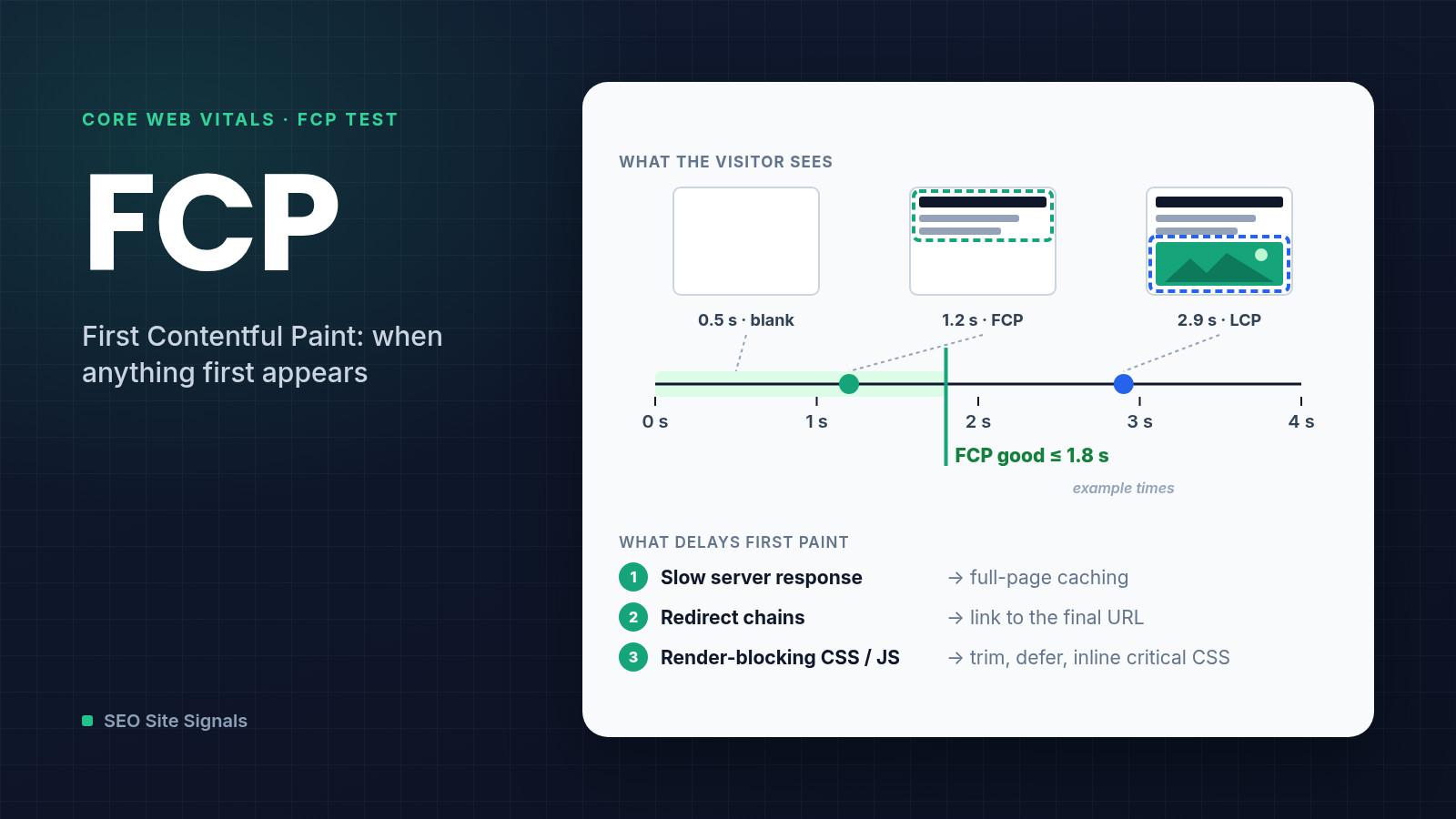
A First Contentful Paint test tells you how long a visitor stares at a blank screen before anything appears: text, a logo, an image, or a non-white canvas. web.dev rates FCP as good at 1.8 seconds or less and poor above 3 seconds. FCP is not one of Google's three Core Web Vitals, but a late first paint almost always drags Largest Contentful Paint down with it. Fix it first and your LCP work stops fighting the same blockers twice.
Below: what FCP measures, how it differs from LCP, what delays it on real sites, and a fix order that doesn't waste a sprint.
What does First Contentful Paint measure?
First Contentful Paint measures the time from when navigation starts until the browser renders the first piece of content from the DOM. According to web.dev, that includes text, images (including background images), <svg> elements, and non-white <canvas> elements. A white screen or a plain background colour does not count.
FCP at the 75th percentile: 1.8 s or less
Rating: Good
FCP at the 75th percentile: 1.8 s to 3.0 s
Rating: Needs improvement
FCP at the 75th percentile: Over 3.0 s
Rating: Poor
FCP includes everything before the paint: DNS, connection, redirects, the server generating the HTML, and the time the browser spends waiting on stylesheets and scripts. That is why it is such a good early-warning metric. It catches server and critical-path problems before they show up as an LCP failure.
How is FCP different from LCP?
FCP marks when the first content appears; Largest Contentful Paint marks when the biggest image or text block in the viewport finishes rendering. LCP is a Core Web Vital that Google uses in its page experience signals. FCP is a diagnostic that helps explain why LCP is slow.
- Fast FCP, slow LCP: the shell paints quickly but the hero image or main content arrives late. Work on the LCP element. The LCP element guide covers that case.
- Slow FCP, slow LCP: nothing can paint yet. Compressing the hero won't help until the critical path is clear.
- Slow FCP, LCP close behind: common on text-heavy pages where the first paint is the headline. Fixing FCP fixes both.
How do you run a First Contentful Paint test?
Run an FCP test against the live production URL, on a mobile profile, and repeat it at least twice so a single cold-cache run doesn't mislead you. Then compare the lab number with field data if your page has enough traffic.
- Paste the URL into the First Contentful Paint Test and note the time.
- Run it again. A big gap between runs usually means caching: the first run hit a cold origin, the second hit a warm CDN.
- Check Time to First Byte. If the HTML itself arrives late, FCP can't be good. The Page Cache Test shows whether your HTML is being served from cache at all.
- Look at the request waterfall in Chrome DevTools. Anything that loads before the first paint marker is on your critical path.
- For field data, open the Core Web Vitals report in Search Console or PageSpeed Insights. Those show real Chrome users over 28 days.
What delays first paint on real small-business sites?
First paint is usually delayed by a handful of predictable things in the page head and on the server. On WordPress, Shopify, and page-builder sites the same few patterns come up again and again, especially after a new plugin, app, or theme update.
Slow server response
How it shows up: Long wait before the HTML arrives
Typical fix: Full-page caching, fewer database-heavy plugins
Redirect chains
How it shows up: http → https → www → trailing slash
Typical fix: Link straight to the final URL; one redirect at most
Render-blocking CSS
How it shows up: Large theme and plugin stylesheets in the head
Typical fix: Inline critical CSS, load the rest without blocking
Synchronous scripts
How it shows up: Tag managers, chat widgets, A/B tools in the head
Typical fix: Add defer or async, move non-essential tags later
Web fonts hiding text
How it shows up: Text invisible until the font downloads
Typical fix: font-display: swap, fewer weights, preconnect to the font host
Client-side rendering
How it shows up: Empty HTML shell filled by JavaScript
Typical fix: Server-render or pre-render the first view
If CSS and JavaScript are the problem, the render-blocking resources guide goes through each file type and what is safe to defer.
In what order should you fix FCP?
Fix FCP from the server outward: first make the HTML arrive quickly, then remove what blocks the browser from painting it, then deal with fonts. Change one class of blocker at a time and re-test the same URL, so you know which change helped.
- Server and redirects. Cache the HTML, remove extra redirects, and check that the CDN is actually caching the page.
- Head scripts. Defer anything that doesn't need to run before the first paint. Most analytics, chat, and marketing tags qualify.
- Critical CSS. Inline the styles needed for the first screen and load the full stylesheet without blocking.
- Fonts. Use
font-display: swapso text shows in a fallback font straight away, and drop weights you don't use. - Re-test, then move to LCP. Once FCP is healthy, measure LCP on the same URL.
Watch for side effects. Swapping fonts and deferring CSS can make content jump when the final styles arrive. The CLS deploy checklist shows how to catch that before users do.
Does FCP affect Google rankings?
FCP is not a Core Web Vital and isn't named in Google's page experience documentation. Google lists LCP, INP, and CLS as the Core Web Vitals its ranking systems use. FCP matters indirectly: it is part of LCP's timeline, so a slow first paint makes a good LCP very hard to achieve.
Google also describes page experience as one signal among many, with relevance still coming first. A faster first paint helps visitors and supports LCP. It won't lift a thin page above a more useful one.
First Contentful Paint FAQ
What is a good First Contentful Paint time?
A good First Contentful Paint time is 1.8 seconds or less at the 75th percentile of page loads. Between 1.8 and 3 seconds needs improvement, and over 3 seconds is poor. These are web.dev's thresholds, and PageSpeed Insights uses them when it reports FCP from field data.
Is FCP a Core Web Vital?
No. The Core Web Vitals are Largest Contentful Paint, Interaction to Next Paint, and Cumulative Layout Shift. FCP is a supporting metric that helps diagnose loading problems. Because it measures the start of the same loading timeline that LCP ends, improving FCP often improves LCP too.
Why is my FCP fast in the lab but slow in Search Console?
Lab tests run one load on a simulated device and network, often against a warm cache. Search Console reports the 75th percentile of real Chrome visits over 28 days, including slow phones, weak connections, and first-time visitors. A slow field FCP with a fast lab FCP usually points to server response time or caching that only works for repeat visits.
Does a loading spinner count as First Contentful Paint?
It can. If the spinner is an image, SVG, or text, the browser counts it as contentful and FCP fires. That is why a fast FCP on a JavaScript app can hide a slow experience. Check LCP too, because it waits for the real content.
How long does an FCP fix take to show in field data?
Field data in Search Console and PageSpeed Insights covers a rolling 28-day window, so it can take up to four weeks for a fix to be fully reflected. Use a lab test to confirm the change immediately, then check the field numbers once the window has refreshed.
Time the blank screen on your busiest page: run it through the First Contentful Paint Test twice, and if the numbers differ a lot, look at caching first.
PositionMySite has been building web software since 2009 from Toronto and Tampa, and SEO Site Signals is our free-tool and site-audit product. Our in-house engineers build every checker on this site, including the FCP test used here, and the paid monitoring dashboard behind them. We keep the single checks free so an owner or developer can find the slow part of a page without buying an enterprise performance suite.
Last updated: September 25, 2026 | Author: David Dayan | Sources: web.dev, "First Contentful Paint (FCP)"; web.dev, "Time to First Byte (TTFB)"; Google Search Central, "Understanding Core Web Vitals and Google search results"; web.dev, "Extract critical CSS".