
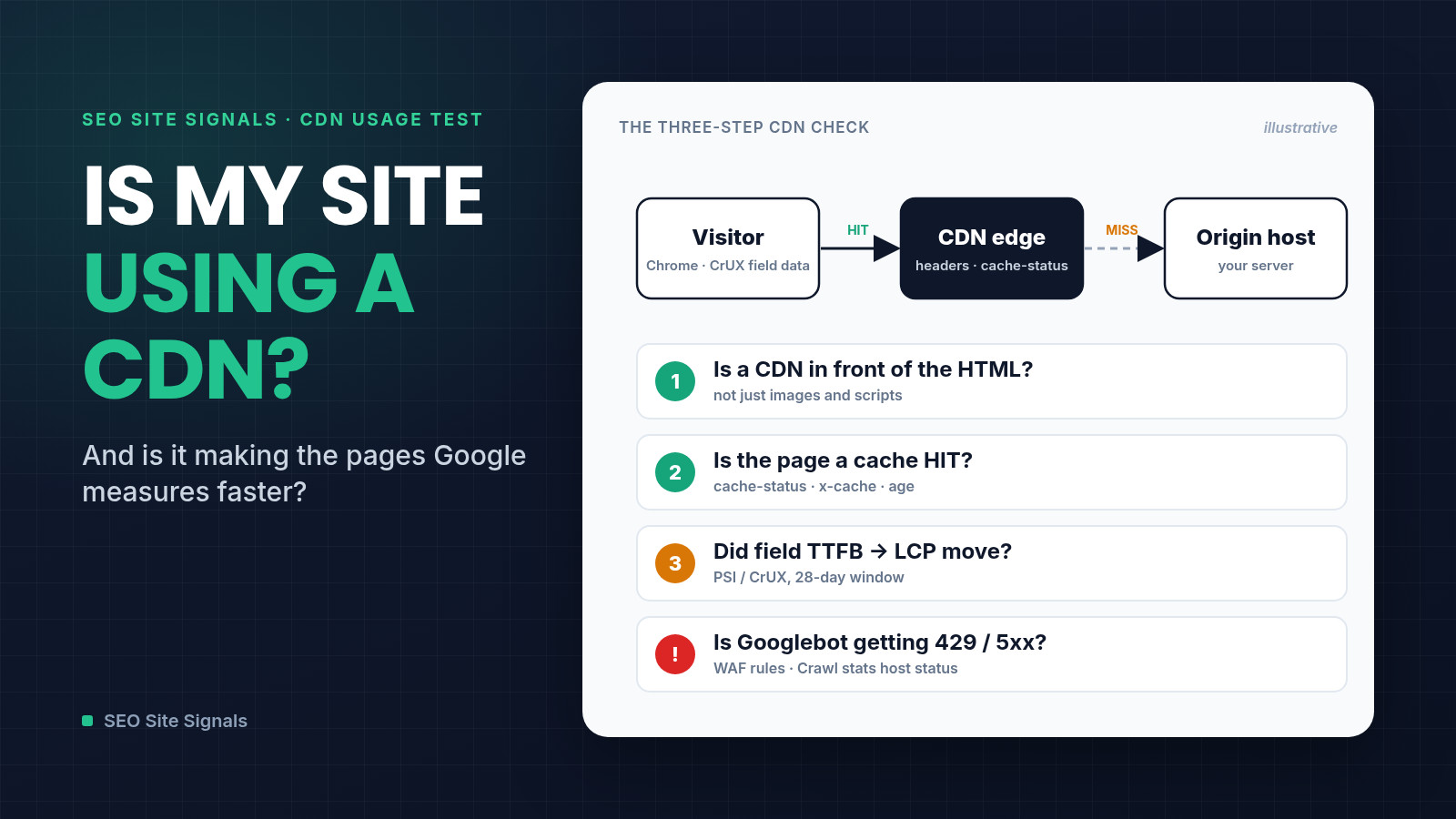
Is my website using a CDN, and is it making pages faster? To answer that, you need three checks. First, find out whether a CDN sits in front of your HTML or only your images. Second, check whether it actually returns cache hits. Third, see whether real-user Time to First Byte (TTFB) moved. Google's web.dev guidance treats a TTFB of 0.8 seconds or less as good and anything over 1.8 seconds as poor. A CDN that only serves your logo will not shift that number.
Most "check my CDN" searches stop at the first question: which vendor is it? That part is easy. The useful questions are whether the CDN is in the path of the page Google measures, whether it is caching that page, and whether it is quietly turning Googlebot away. Here is how to answer all three without an enterprise monitoring contract.
How to tell if your website is using a CDN
A website is using a CDN when its responses come from an edge network instead of straight from your host. You can see this in two places, the HTTP response headers and DNS. Vendor headers and a CNAME that points to a CDN domain together make a strong case. Either one on its own is only a hint.
- Headers: look for vendor request IDs such as
cf-ray(Cloudflare),x-amz-cf-id(CloudFront) orx-served-by(Fastly), plusx-cache,cf-cache-statusor the standardcache-status. age: a shared cache adds this header when it serves a stored copy. A non-zeroagemeans a cache answered, even if no vendor is named.- DNS: a CNAME to a CDN-run hostname is the clearest signal, because the application cannot fake it.
From a terminal, curl -sI https://www.example.com/ shows the headers in a second. If you would rather not use a terminal, a CDN tester that reads headers, edge location and cache status for you does the same job. You can check which CDN a site uses and whether the edge answered from cache, and you can compare the result against a competitor's homepage.
Missing headers do not prove there is no CDN, because some setups strip them. Treat "nothing found" as "not shown", then confirm with DNS.
HTML vs. images: why a CDN on assets alone barely moves TTFB
TTFB measures how long the browser waits for the first byte of the HTML document. Many small-business sites put images, CSS and JavaScript on a CDN subdomain while the HTML still comes from a shared host on every request. That helps later downloads, but it does nothing for the first byte.
Run your test on the page URL itself, not on an image URL. Then look at three things:
HTML served by the edge, cache HIT
What it means: the CDN answered without asking your host. This is the case where a CDN can actually lower TTFB.
Next: confirm field TTFB improved (step three below).
HTML through the edge, cache MISS or DYNAMIC
What it means: the CDN is a proxy. Every request still waits on your server, with an extra hop added.
Next: look at the cache rules for HTML. Check the page cache result and the cache policy on your static files.
Only assets on a CDN hostname
What it means: images and scripts are faster to fetch, but the document's first byte is unchanged.
Next: decide whether your HTML can be cached at all, even for a short time.
Pages behind a login, shopping carts and personalized pages usually cannot be cached. Marketing pages, service pages and blog posts usually can.
How to run a fair CDN performance test
A CDN performance test is fair only when it measures the edge the way your visitors reach it. Three mistakes produce misleading numbers.
- Cache-busting: adding
?v=123to every request forces a MISS, so you end up timing your origin instead of the CDN. - One cold run: the first request after a purge is a MISS. Run the test twice in a row and record both results. The gap between them is your cache's value.
- The wrong location: a test from a data center near your host flatters the origin. Test from the regions where your customers actually are.
Any CDN test online is a lab snapshot from one place at one moment. Use it to find the cause, then confirm with field data. The page speed test and Speed Index test show whether the HTML arrives sooner and the page paints sooner after a cache change.
Why it matters to Google, part 1: TTFB is the first slice of LCP
TTFB is not a Core Web Vital, but it comes before all of them. web.dev notes that, for navigation requests, TTFB "precedes every other meaningful loading performance metric," including First Contentful Paint and Largest Contentful Paint. Google's Core Web Vitals page says it highly recommends good Core Web Vitals "for success with Search." Google's page experience guidance also says its core ranking systems look at signals that align with page experience.
The Chrome UX Report (CrUX), which feeds PageSpeed Insights and Search Console, has three caveats worth knowing.
- CrUX collects TTFB only on full page loads. LCP also includes back/forward-cache and prerendered navigations, so the sample sizes differ.
- CrUX notes that TTFB is "not a direct measure of server response time." It includes redirects and depends on whether the response came from cache, a CDN or the server.
- Field data is a rolling 28-day window, so a CDN change shows up gradually, not the next morning.
For context, the HTTP Archive Web Almanac 2025 found that 44% of mobile websites have good TTFB (17% poor). On desktop the figure is 55% (12% poor). The same report shows CDN use falling with popularity: 71% of the top 1,000 sites on mobile, but 35% of the top 10 million.
No published field study gives a universal "a CDN makes sites X% faster" figure. The Web Almanac 2024 CDN chapter says outright that it did not measure CDN TTFB or Core Web Vitals, because attribution is unreliable. Your own before-and-after numbers are the only ones that count. After you check TTFB, run the First Contentful Paint test and the Largest Contentful Paint test to confirm the gain carried through.
Why it matters to Google, part 2: crawl capacity and bot rules
Google sets a crawl capacity limit, also called hostload, so it does not overload your server. Google's crawl budget documentation is direct about this. If a site slows down or "responds with server errors (5xx HTTP status codes) or rate-limiting signals (such as HTTP 429), the limit goes down and Google crawls less." Its guidance on reducing crawl rate adds that a significant number of 500, 503 or 429 responses lowers the crawl rate across the whole hostname.
A CDN can push this either way:
- Helps: cached HTML answers quickly and takes load off a small shared host, so Googlebot's requests stop competing with your visitors for the same server.
- Hurts: a WAF or bot-fight rule that serves Googlebot a challenge, a 403 or a 429 cuts how much Google crawls your site. Fake Googlebots are real, so verify the genuine one by reverse DNS or Google's published IP ranges. Do not block by user-agent string.
To check, open Settings → Crawl stats in Search Console. Look at average response time, host status and the share of 5xx and 429 responses, both before and after you enable or change the CDN.
What a CDN can't fix
A CDN delivers bytes from closer to the visitor. It does not make those bytes smaller or the page lighter. Render-blocking CSS, heavy JavaScript and oversized images are still slow when they come from an edge server. That is a different job, covered in our guide on what to fix first on a slow website. Two things do sit at the edge and are worth confirming: Brotli compression and HTML compression.
A before-and-after checklist
- Before the change, note field TTFB, FCP and LCP in PageSpeed Insights (the origin and your top page), along with Crawl stats response time.
- Confirm which CDN serves the HTML, not just the assets, and whether the response is a HIT.
- Fix the cache rules for pages that can be cached, and review your WAF or bot rules for verified Googlebot.
- Run a warm lab test from your customers' regions.
- After 28 days, compare the field data again. Keep the change only if the numbers show it worked.
FAQ: CDN and page speed
How do I check if my website uses a CDN?
Read the response headers of your page URL for vendor IDs such as cf-ray, x-amz-cf-id or x-served-by, or a non-zero age header. Then look up the hostname's CNAME. A CDN-run domain in DNS together with vendor headers is strong evidence. Missing headers are not proof, because some configurations strip them.
Does a CDN improve SEO?
Not directly. Google does not reward using a CDN. It looks at page experience signals such as Core Web Vitals, and it crawls less when your host is slow or returns errors. A CDN helps only when it actually lowers real-user TTFB and LCP, or keeps your server responsive for Googlebot.
Why is my site still slow with a CDN?
The usual causes are HTML that is never cached, a cache MISS on every request because of cookies or query strings, or a page that is simply heavy. Check the cache status on the document itself, then look at render-blocking files and image weight, which a CDN does not change.
Can a CDN or firewall block Googlebot?
Yes. Bot-protection rules can serve Googlebot challenges, 403s or 429s. Google's documentation says that significant numbers of 429 and 5xx responses reduce its crawl rate for the whole hostname. Allow verified Googlebot, checked by reverse DNS or Google's IP ranges, and watch host status in Crawl stats.
How long until a CDN change shows in Core Web Vitals?
CrUX field data covers a rolling 28-day window, so expect a gradual shift over about four weeks. Lab tests show the change straight away, but Search Console and PageSpeed Insights field data take that long to fully reflect it.
Run the free scan: paste your homepage into the full SEO Site Signals scan for CDN, caching, compression and Core Web Vitals checks in one report, with no signup.
SEO Site Signals is the free audit product from PositionMySite, a North American software company in Toronto and Tampa. Since 2009 our in-house engineers have built the checks on this site, from edge caching to Core Web Vitals, so small teams can see what their hosting is really doing before they pay for another platform.
Last updated: October 15, 2026 | Author: Paul Patrick | Sources: web.dev, Time to First Byte; Google Search Central, Understanding Core Web Vitals; Google Search Central, Page experience; Chrome UX Report, Methodology; Chrome UX Report, Metrics; Google, Crawl budget management; Google, Reduce Googlebot crawl rate; Google, Verify Google's crawlers; Search Console Help, Crawl Stats report; Web Almanac 2025, Performance; Web Almanac 2025, CDN; Web Almanac 2024, CDN.