
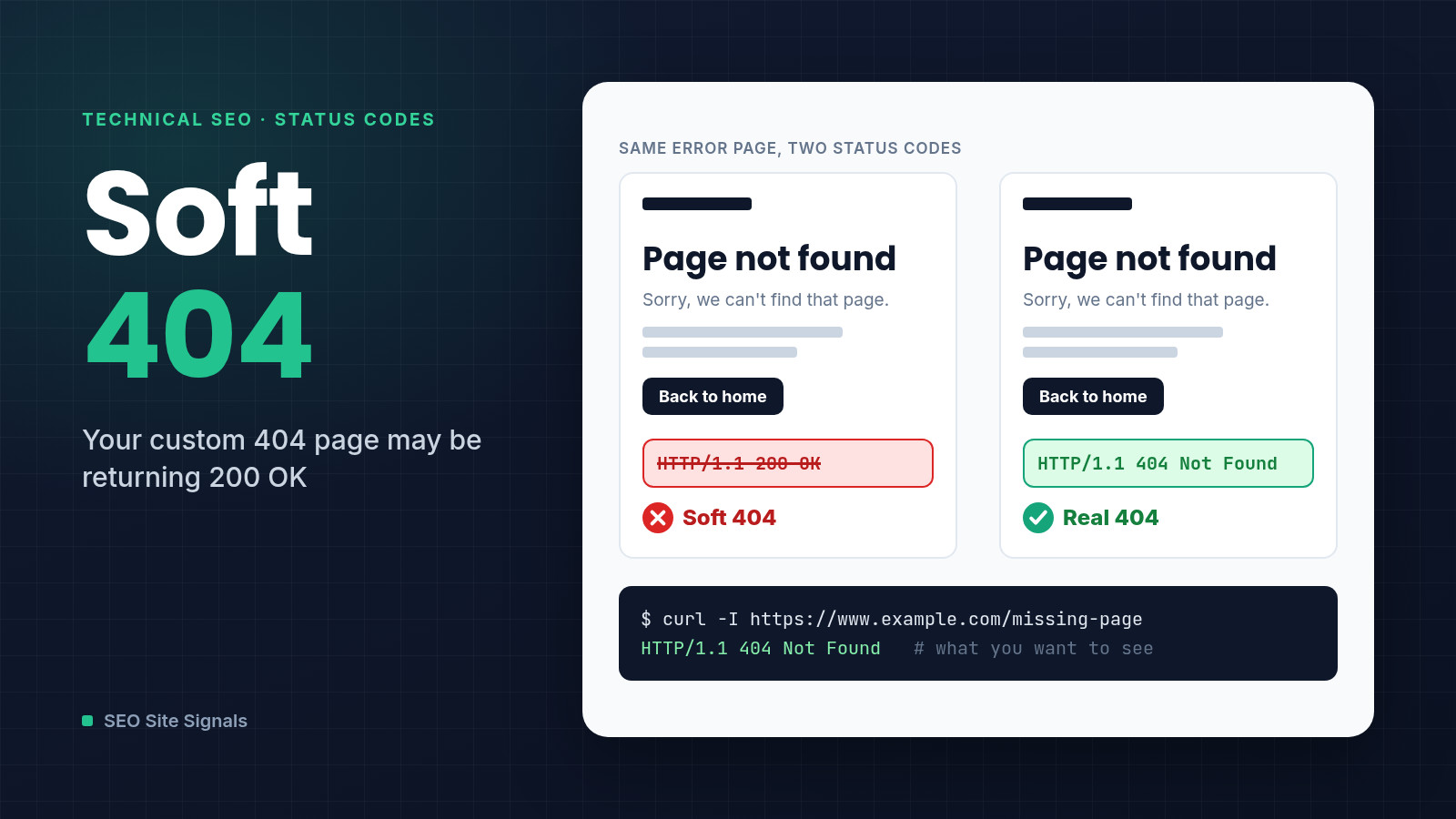
A soft 404 in Google Search Console means a URL told Google "success" (HTTP 200) while showing a "page not found" message or a nearly empty page. Custom 404 pages are one of the most common causes: the branded error page looks right to visitors, but the server sends it with a 200 status. Google's fix is simple. Pages that do not exist should return a real 404 or 410. Here is how to check yours and fix it.
What is a soft 404 in Google Search Console?
A soft 404 is a page that returns a success status code but whose content tells users and Google that nothing is there. In the Page indexing report, Google lists these under "Soft 404" and describes them as pages that return "a user-friendly 'not found' message but not a 404 HTTP response code." Google does not index them.
Google flags two kinds of pages as soft 404s:
- Real error pages sent with a 200. A missing product or deleted post that shows "Sorry, this page doesn't exist" but tells the crawler everything is fine.
- Real pages that look empty. An empty category, a search results page with no results, a product page that only says "no longer available," or a page whose content failed to render. Google's HTTP status documentation says a 2xx page whose content "suggests an error... an empty page or an error message" will show as a soft 404.
The first kind is a server configuration problem. The second is a content problem. This guide is mostly about the first, because that is the one your custom 404 page causes.
Why does a custom 404 page cause soft 404s?
A custom 404 page causes soft 404s when it is served as a normal page instead of as an error response. Visitors cannot see the status code, so the page looks perfect in a browser while every missing URL on the site reports HTTP 200 to Google. That usually happens in one of four ways:
Apache ErrorDocument 404 pointing to a full URL (https://example.com/404.html)
What goes wrong: Apache sends a redirect to the error page instead of the error
What the crawler sees: 302, then 200 on the error page
A "404" page built as a normal CMS page, with missing URLs redirected to it
What goes wrong: The redirect target is a live page that returns 200
What the crawler sees: 301 or 302, then 200
A plugin or rule that redirects every missing URL to the home page
What goes wrong: Google treats irrelevant redirects to the home page as soft 404s
What the crawler sees: 301 to the home page
A single-page app (React, Vue, Angular) whose server returns the app shell for every path
What goes wrong: The app draws a "not found" screen in the browser, but the server already answered 200
What the crawler sees: 200 with a not-found message
Google's Search Console help on 404 errors is direct about the redirect case: returning a code other than 404 or 410 for a page that does not exist, "or redirecting users to another page, such as the homepage, instead of returning a 404," creates soft 404s. Redirect a URL only when there is a genuinely relevant replacement.
How do you check whether your 404 page returns a real 404?
Request a URL that cannot exist on your site and look at the HTTP status code, not the page. If the final response is 404 or 410, you are fine. If it is 200, or a redirect that ends on a 200 page, you have a soft 404 problem on every missing URL. Three ways to check:
- Use a checker. The Custom 404 Page Test requests a deliberately broken URL on your domain, records the status code, and flags a 200 response as a soft 404. It also checks that the page is branded and gives visitors navigation, search, or a home link.
- Use the command line. Run
curl -I https://yourdomain.com/this-page-should-not-exist-123and read the first line. Add-Lto follow redirects and see where they end up. - Use the browser. Open DevTools, go to the Network tab, load a made-up URL, and check the Status column for the document request.
What does the curl output look like for a real 404 and a soft 404?
We ran the check on September 25, 2026, against made-up paths. The output below is real, trimmed to the lines that matter. In every case, read the first line of each response. The number after HTTP/2 or HTTP/1.0 is the status code a crawler receives, whatever the page itself says.
A correct 404 (GitHub). GitHub answers a path that does not exist with a 404 straight away:
$ curl -sI https://github.com/this-page-should-not-exist-a407e20b
HTTP/2 404
content-type: text/plain; charset=utf-8
server: github.com
The first line says 404, so Google knows the URL does not exist and drops it. That is the result you want from your own site.
A soft 404 (our demo server). To show the broken case without naming anyone's site, we ran a small demo server on our own machine. It is set up the way many misconfigured sites are: every path returns a "Page not found" page with a 200 status.
$ curl -sI http://localhost:8080/this-page-should-not-exist-a407e20b
HTTP/1.0 200 OK
Content-Type: text/html; charset=utf-8
Content-Length: 671

$ curl -s http://localhost:8080/this-page-should-not-exist-a407e20b | grep -o '<title>.*</title>'
<title>Page not found</title>
The page title says "Page not found," but the first line says 200 OK. That mismatch is what Google reports as a soft 404.
A redirect to the error page (same demo server). Here the demo copies the Apache full-URL mistake. It redirects the missing URL to /404.html, and that page returns 200. Plain curl -I stops at the first response, so add -L to follow the redirect:
$ curl -sIL http://localhost:8080/old/this-page-should-not-exist-a407e20b
HTTP/1.0 302 Found
Location: /404.html

HTTP/1.0 200 OK
Content-Type: text/html; charset=utf-8
With -L, curl prints one block per response. Read the first line of the last block. Here it is 200 OK, so the missing URL ends on a page that claims success. It is still a soft 404, even though the first response was a redirect.
Test more than one path. Many sites return a proper 404 at /random-page but a 200 under /blog/random-page or /products/random-page, because each section is served by a different route, plugin, or app.
For a URL already flagged in Search Console, run the URL Inspection live test and choose "View tested page." The screenshot shows what Google rendered, which tells you whether you are dealing with an error page or a real page that looked empty.
How do you fix a custom 404 page that returns 200?
Keep the custom design and fix how it is served: the same branded page, sent with a 404 status. The right change depends on where the page comes from:
- Apache: point
ErrorDocument 404at a local path such as/404.html, not a full URL. The Apache documentation warns that a remote URL makes the server send a redirect, so "the client will not receive the original error status code." - Nginx: use
error_page 404 /404.html;and do not add=200, which overrides the status. - WordPress and other CMSs: the theme's 404 template returns a 404 by default. If you get a 200 or a redirect, look for a redirect or "404 to homepage" plugin, or a catch-all rule in the host's settings.
- Single-page apps: have the server return 404 for routes it knows do not exist. If routing is only client-side, Google's JavaScript SEO guidance suggests a JavaScript redirect to a URL that returns 404 (for example
/not-found), or adding<meta name="robots" content="noindex">to the error view. - Removed pages with a real replacement: use a 301 to that specific page. Everything else should return 404 or 410.
Google treats 404 and 410 the same way for indexing: the URL is dropped and its content is ignored. Pick whichever your platform makes easy.
What if the flagged URL is a real page?
If Search Console flags a page that should exist, Google thinks the content looks like an error or is empty. Fix the page, not the status code. Common causes are empty category or tag pages, internal search results, out-of-stock product pages reduced to a single "unavailable" line, and pages whose main content only loads through JavaScript that failed during rendering.
Add real content, merge the empty page into a stronger one, or keep it out of the index with noindex if it has no search value. For rendering problems, the URL Inspection screenshot will show a blank or half-loaded page.
How do you confirm the fix in Search Console?
After deploying, re-test a missing URL and confirm it returns 404. Then open the Soft 404 reason in the Page indexing report and click "Validate fix." Google recrawls the affected URLs over the following days or weeks. Fixed error URLs move to "Not found (404)," which is where they belong. A 404 for a page that really does not exist is not an error to fix.
Soft 404 FAQ
Are soft 404s bad for SEO?
Soft 404s are not a penalty, but they waste crawling on URLs that should be dropped, and they hide real problems in your reports. When the flagged URL is a page you want indexed, it is a direct loss, because Google will not index a page it classifies as a soft 404.
Should I redirect all 404 pages to my home page?
No. Google's Search Console help says redirecting missing pages to the home page instead of returning a 404 creates soft 404s. Redirect a removed URL only to a closely related replacement, and let everything else return 404 or 410 with a helpful custom error page.
What is the difference between a 404 and a soft 404?
A 404 is an HTTP status code that tells browsers and crawlers the page does not exist. A soft 404 is Google's label for a page that returns 200 but looks like an error or an empty page. The first is correct behavior. The second is a mismatch between the status and the content.
Can a custom 404 page still return a 404 status?
Yes. The design and the status code are separate. A branded page with navigation, search, and links to popular pages can and should be sent with a 404 status. Visitors get a helpful page, and Google gets the signal to drop the URL.
Why does Google flag my real page as a soft 404?
Google flags a real page as a soft 404 when its content looks like an error or is nearly empty, for example an empty category, a thin "out of stock" page, or a page whose content did not render. Use URL Inspection to see what Google rendered, then add content or noindex the page.
Check your error page before Google does: run a made-up URL on your domain through the Custom 404 Page Test and confirm it answers with a real 404.
SEO Site Signals comes from PositionMySite, a North American software company based in Toronto and Tampa that has been building for the web since 2009. Our in-house team designs and runs the free checks on this site, including the custom 404 test in this article, along with the paid monitoring dashboard. We keep the free tools free so small businesses can find a problem like this without buying an enterprise SEO suite.
Last updated: September 25, 2026 | Author: Bogdan Blokhin | Sources: Search Console Help, "Page indexing report"; Search Console Help, "404 (Page Not Found) errors"; Google, "How HTTP status codes affect Google's crawlers"; Google Search Central, "JavaScript SEO basics"; Apache HTTP Server, ErrorDocument directive.