
A website that sends people to a site you did not choose is not always hacked. It is a hack when the redirect did not come from you, your web host, your domain settings or the visitor's own device. Quite often it is one of those four. To tell which, check three things: where the first jump to the other site happens, who sees it, and what Google's Security issues report in Search Console says. If the jump happens on your own server, only some visitors see it, and you never set it up, treat it as a hack and act the same day.
Below are the checks behind that verdict. Redirects you set up on purpose, for a site move or a renamed page, are not covered here. Every Google rule links to its source.
Is a redirect to another site always a sign my website was hacked?
No. Google's own spam policies list legitimate reasons to redirect, such as moving a site to a new address, combining several pages into one, or sending users to an internal page after they log in.
The same policies describe what a hacked redirect looks like. Under hacked content, Google says attackers "might inject malicious code to your website that redirects some users to harmful or spammy pages," and that the redirect sometimes depends on the referrer, the user agent or the device. Under sneaky redirects, its example is a site that shows desktop users a normal page while sending mobile users to "a completely different spam domain."
So the useful question is whether anyone on your side created this redirect, and whether it treats some visitors differently. One nobody can explain, firing only for some people, is the pattern Google describes as a hack.
Where is the redirect coming from: my device, my domain or my site?
Work out who sees the redirect before you touch the site. Each pattern below points to a different source and a different first step.
Only on one computer, browser or network
Likely source: the device or the connection. An extension, adware, a public Wi-Fi network or an old cached redirect can affect one person while everyone else gets your site. First step: open the site on a phone using mobile data. If it loads normally, the problem is probably the first device.
For everyone, on every page, including your own admin login
Likely source: the domain or the hosting account. An expired domain, changed DNS records, a registrar forwarding setting or a suspended hosting account can send the whole domain elsewhere. First step: check the renewal date, DNS records and any forwarding rule at your registrar and host, and ask the provider about any change your team did not make.
Only on some pages, or only for some visitors
Likely source: the site itself. A server rule, plugin, theme file or page script is deciding who gets sent away. If nobody on your team added it, this is the pattern that most often means the site has been compromised.
Note the device, time and starting page each time. You will reuse these notes to confirm the fix.
Why can't I see the redirect when my visitors can?
Hacked redirects are often built to hide from the owner. Google's spam policies give the classic example: clicking your URL in Google Search results can send someone to a suspicious page, while typing the same URL straight into a browser shows nothing wrong. The same section notes that attackers commonly use cloaking to make a hack harder for the owner to detect.
So "it works fine for me" proves little: you are logged in, you type the address, and your browser knows the site. To see what a stranger sees, change as much of that as you can:
Arrive the way a searcher does
Search Google for your business name or a page title, then click through from the results instead of typing the address.
Use a clean browser and a different network
A private window, logged out, on a phone with Wi-Fi off, then a second device.
Ask the person who reported it
Get the exact page, the device and how they got there (search, ad or email link).
If you still cannot reproduce it, do not close the case. Google's Security issues report help says warnings depend on the browsing context and may not be reproducible, and that the report itself should be treated as the source of truth.
What does the redirect trace tell me about who put it there?
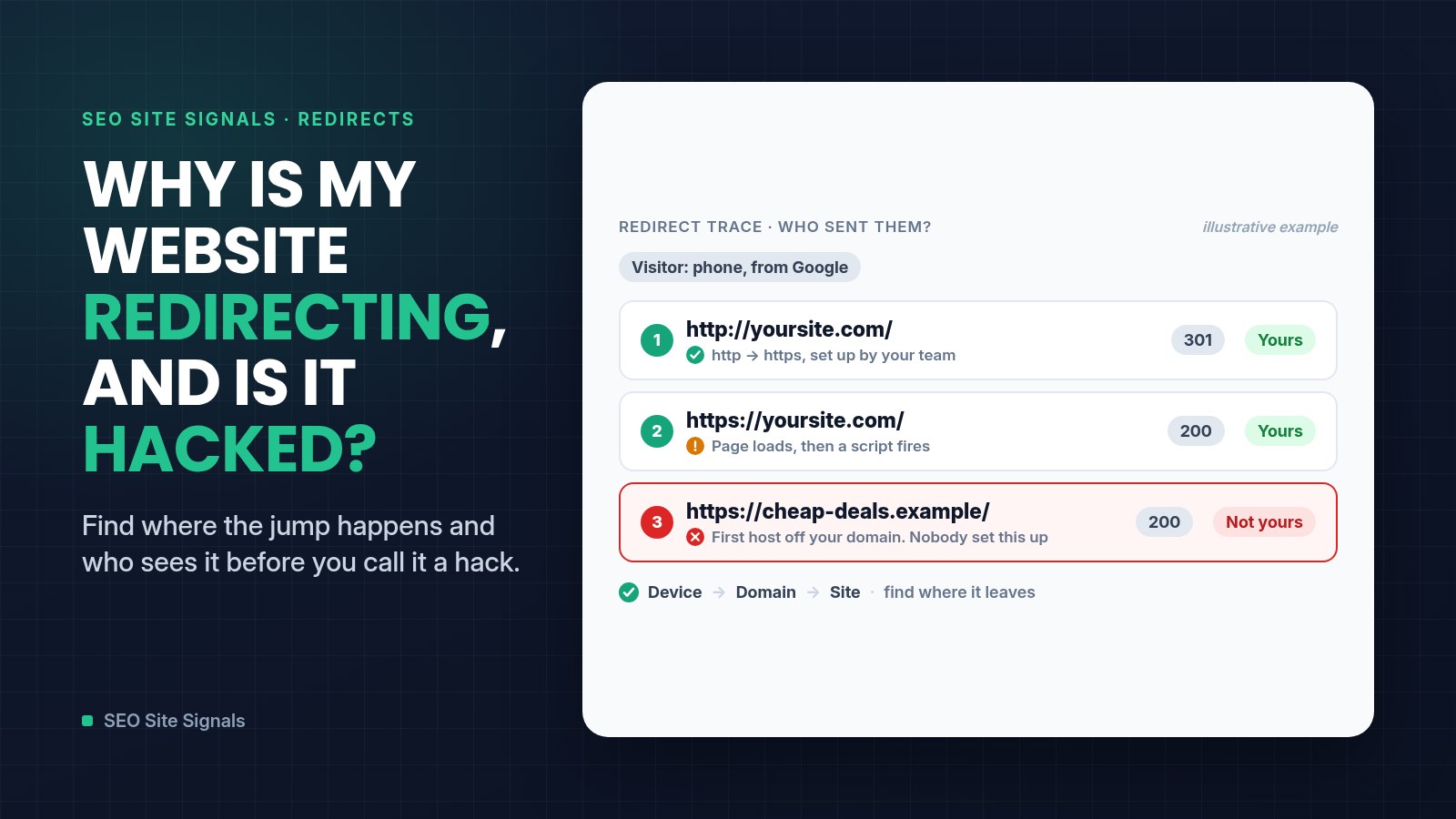
A trace lists every address a request passes through, with the status code at each step. In Chrome, open DevTools, go to the Network tab, tick "Preserve log" and "Disable cache," then load your page. Or run curl -sIL https://yourdomain.com/ in a terminal, which prints each response and its Location header. Google's request-a-review guide also suggests cURL or Wget for viewing your pages safely.
Read the trace for three things:
Where it leaves your domain
Find the first address that is not yours. A jump before any page loads comes from the server, host or domain settings. If your page loads first and then moves on, a script or tag on the page did it.
Whether the first hop is one you recognise
An http-to-https or www hop your team set up is normal. A hop to an unrelated domain or a long random address is not.
Whether it changes with how you arrive
Repeat it as a phone, as a desktop, and as if you came from Google (curl sends a referrer with -e https://www.google.com/). A redirect that appears in only some runs matches Google's description of a hacked, conditional redirect.
Know the limits. A server-side trace only shows redirects sent in HTTP responses. It does not run the page's scripts, so a script-based redirect, or one that fires only for certain visitors, can pass while the problem is still there. A clean trace is one piece of evidence, not an all-clear.
What should I do first if the redirect is a hack?
Contain first, repair second. In order:
1. Open the Security issues report in Search Console
Google lists hacked content, malware and social engineering there, with sample affected URLs (not necessarily all of them) and the date it first detected the issue.
2. Protect visitors and change every password
Ask your host to take the site offline or put it in maintenance mode if needed. Then change the passwords for hosting, the CMS, FTP or SFTP, the database and the domain registrar, and remove any user accounts you do not recognise.
3. Clean all of it, and close the way in
Google's help is blunt: fix the issue throughout your site, because fixing just some pages does not earn a partial return to search results. That includes finding how the attacker got in, such as an outdated plugin or a leaked password. If your team does not work with server files and code, bring in your host or a security professional here.
4. Request a review
When every listed issue is fixed, select Request Review in the report and describe the issue, what you did and the result. Google says reviews can take several days or weeks, and asks you not to resubmit while one is pending.
Hacked content and sneaky redirects are both on Google's spam policy list, and the policies state that violating sites "may rank lower in results or not appear in results at all." If you want the wider picture of what those policies cover, our spam update checklist walks through them.
How do I confirm the redirect is gone?
Repeat the exact tests from your notes: same pages, devices, networks and entry points, including the click-through from Google results. Run the trace again from outside your network, especially for the kind of visitor who saw the redirect before.
Then confirm it on Google's side. The Security issues report should show no issues once your review succeeds; Google emails you when the review is received and again when it is complete. For your most important pages, run a live test in the URL Inspection tool to see what Google fetches today. Our URL Inspection guide explains how to read that result, including the status for addresses that redirect on purpose.
Keep watching for a few weeks. If the same pattern returns, the way in was probably never closed.
Frequently asked questions
Can a browser extension or my own Wi-Fi make my website redirect?
Yes. Extensions, adware and some public networks can redirect pages on one device or connection. If it disappears on a phone using mobile data, look at that device or network before changing the site.
Does a 301 or 302 tell me whether a redirect is malicious?
No. The status code only says whether the redirect is meant to be permanent or temporary. Intent shows in where it goes and who set it up.
Will a hacked redirect hurt my Google rankings?
It can. Hacked content and sneaky redirects both break Google's spam policies, and Google says violating sites may rank lower or not appear at all.
Why does my site only redirect when I arrive from Google?
Because the hack is checking the referrer. Google's own example of a hacked redirect is a link clicked in its results that goes somewhere suspicious, while the same address typed directly looks normal.
Should I delete the redirect rule I found and move on?
No. Google asks you to fix the issue throughout the site, and the attacker's way in is usually still open. Remove the rule as part of a full cleanup, change passwords, close the vulnerability, then request a review.
Is a redirect from http to https, or from www to non-www, a sign of a hack?
No. Those hops keep visitors on your own domain. Worry when the trace leaves your domain for one you do not recognise.
Next step: to see whether your homepage or a reported page sends visitors through redirects from outside your own network, check this URL for redirects. It follows the HTTP redirects on that address and flags extra or multiple hops. It does not run page scripts, so pair it with the visitor checks above.
SEO Site Signals is made by PositionMySite, a North American software company with offices in Toronto and Tampa, building web software since 2009. Our in-house team designs and maintains the free speed, on-page and security checks on this site, and the monitoring dashboard behind them, so small and mid-size teams can understand what their own data says before they pay for an enterprise SEO suite.
Last updated: November 26, 2026 | Author: Jay Patel | Sources: Google Search Central, Spam policies for Google web search; Search Console Help, Security issues report; web.dev, Request a review; web.dev, Help, I think I've been hacked; Google Search Central, Redirects and Google Search; Search Console Help, URL Inspection tool (all checked November 26, 2026).