
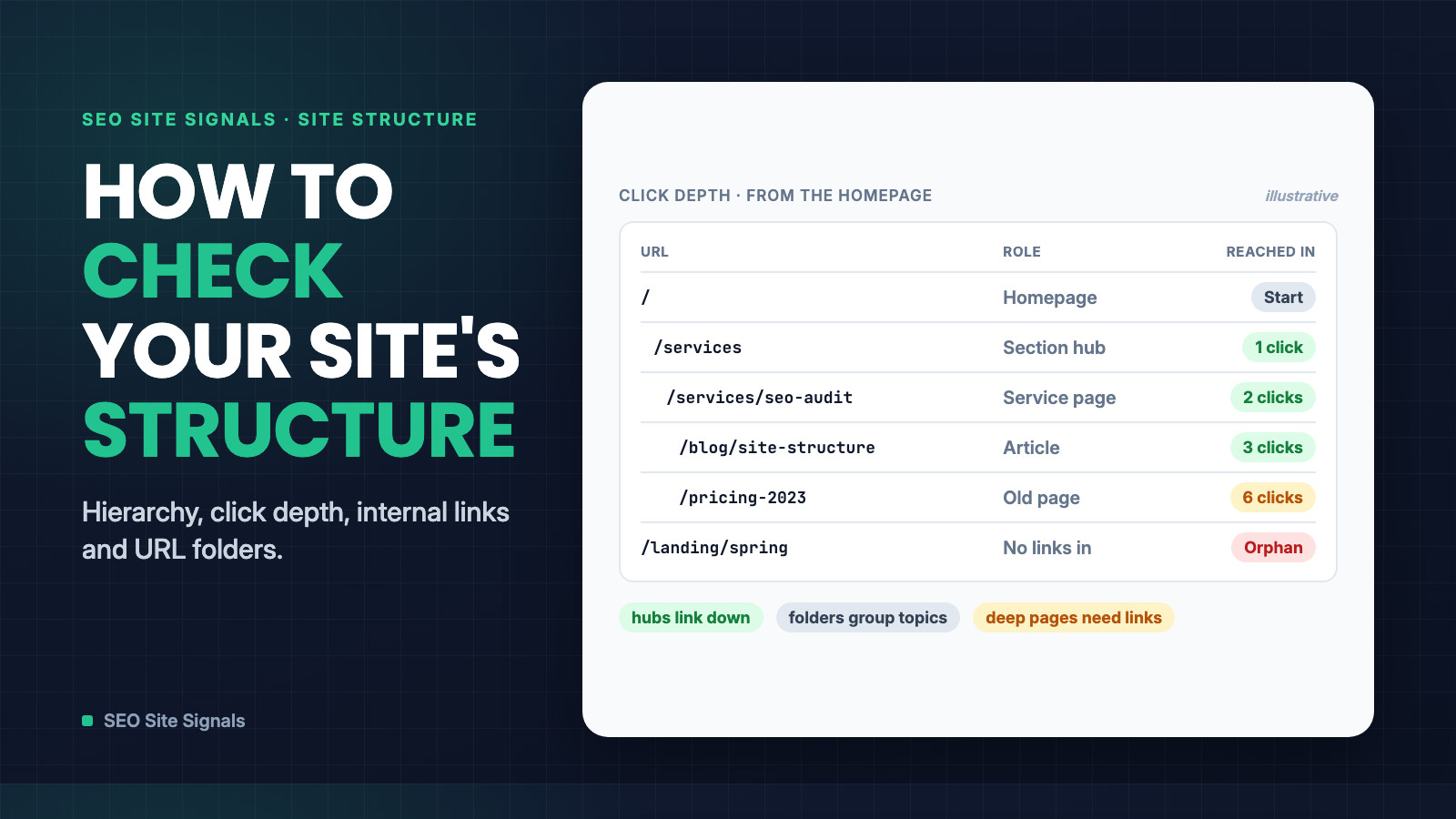
A well-organized website puts every important page within a few clicks of the homepage, groups related pages under clear section pages, and links them with plain HTML links that use descriptive text. Google says it works out a site's structure mainly from those links, not from the folders in your URLs. So to check your site's structure, look at three things in this order: how many clicks each page sits from the homepage, which pages get the most internal links, and whether your URLs and sitemap tell the same story.
Most "website structure checker" pages draw a tree from your sitemap and stop there. A tree of folders is useful, but it isn't what Google measures. This guide covers what Google has actually said about site structure, the checks that matter, and the fixes worth making on a real site.
What Google actually reads when it maps your site
Google's guide to ecommerce site structure is the clearest statement on this, and it applies to any site. It says Google can use the number of links it has to follow to reach a page, and the number of links pointing to a page, to infer how important that page is compared with the rest of your site. It also says Google generally doesn't look at the structure of URLs to work out the structure of a site.
That has two practical consequences. First, a page five folders deep in its URL can still be one click from the homepage, and that click is what counts. Second, a page you link from the homepage and from many articles is telling Google it matters, whatever its address looks like.
The SEO Starter Guide adds a useful calm note: organizing your site logically helps search engines and people understand how pages relate, but you shouldn't drop everything to reorganize, because search engines will likely understand your pages as they are. Structure work pays off most on larger sites and on sites that are growing.
The parts of a site's structure
Every site's structure comes down to a few layers. Check each one separately, because each fails in its own way.
Hierarchy
What it is: the homepage, a small set of section or hub pages, and the detail pages under them.
Why Google cares: hubs that link down to every page in their section give crawlers a path to everything and show which pages belong together.
Click depth
What it is: the fewest clicks needed to reach a page from the homepage.
Why Google cares: Google names the number of links it must follow as one input to a page's relative importance.
Internal links
What it is: menus, footers, breadcrumbs and links inside your content.
Why Google cares: Google finds most new pages through links, and every page you care about should have a link from at least one other page on your site.
URL folders
What it is: the readable path, such as /services/seo-audit.
Why Google cares: on sites with more than a few thousand URLs, grouping similar pages in folders can help Google learn how often each section changes. Parts of the URL can also show as breadcrumbs in results.
Check 1: click depth from the homepage
Start with the pages that earn you money or leads: services, products, pricing, contact and your best guides. For each one, count the fewest clicks a visitor needs from the homepage, using only links in the page, not the site search box. Google's ecommerce guide points out that Googlebot generally doesn't type into search boxes, so a page you can only reach by searching is effectively hidden from crawling.
On a small site you can do this by hand. On a larger one, run any crawler that reports crawl depth, sort by depth, and read the deepest pages first. You are looking for important pages sitting far below where their value suggests. There is no official Google limit on depth. The common advice to keep key pages within about three clicks is a convention, not a rule from Google, but it is a sensible target for the pages that matter most.
Fixes are usually small. Link the page from its section hub, from the homepage if it's a top seller or top service, or from two or three related articles. You rarely need to change its URL.
Check 2: which pages your links say are important
In Google Search Console, the Links report lists your top internally linked pages. Read that list as Google sees it: is your homepage first, are your main services and categories near the top, and are any utility pages such as login, tag archives or old campaign pages ranking above them? If the list doesn't match your priorities, your navigation and footer are probably sending the wrong signal.
While you're there, look for pages you care about with almost no internal links. Those are candidates for the orphan and near-orphan check in our guide to finding every page on a website, which compares your sitemap, crawl and Search Console lists side by side.
Two link mistakes are worth ruling out on every key page:
Links Google can't follow
Google's link best practices say it can generally only crawl an <a> element with an href. Menus built from buttons or onclick events may never be followed.
Internal links marked nofollow
A template that adds nofollow to your own links weakens the path to those pages. Check a page's links with the nofollow test, and see our post on nofollow, sponsored and ugc links for when each value belongs.
Link text matters too. Google says good anchor text tells people and Google what the linked page is about. Swap "click here" and "read more" for words that name the destination; the descriptive link text test lists generic anchors on any page.
Check 3: URLs, sitemap and duplicates
URLs aren't how Google maps your hierarchy, but messy URLs still cause structural problems. Google's URL structure best practices recommend readable words over long IDs, hyphens between words, as few parameters as you can, and one consistent letter case, because Google treats /APPLE and /apple as different URLs. It also warns that filters, session IDs, sort parameters and endless calendars can create huge numbers of URLs for the same content, which wastes crawling.
Work through these on the live site:
Readable, consistent URLs
Spot-check key URLs for length, case, parameters and word separators with the URL analysis test.
One URL per page
Trailing slashes, www and http versions should redirect to one address. Trace them with the redirect checker and confirm the target with the canonical tag test.
A sitemap that matches the site
Your XML sitemap should list the pages you want indexed and nothing else. Validate it with the sitemap checker, and keep crawl rules for filter and search URLs in robots.txt.
A sitemap helps Google find pages, but it doesn't replace links. Google's ecommerce guide recommends linking to every page you want indexed and using a sitemap for pages a crawler wouldn't otherwise reach.
Structure inside the page
Within a page, headings and breadcrumbs help visitors find their place. Be precise about what they do for Search. Google's starter guide says heading order is great for screen readers but doesn't matter from Google Search's perspective, so use the heading checker as an accessibility and clarity check rather than a ranking fix. Breadcrumb links, on the other hand, are real internal links up the hierarchy, and breadcrumb structured data can influence how your URL path shows in results. The structured data test shows whether a page carries that markup.
When a restructure is worth it, and when it isn't
Most sites don't need new URLs. Adding hub pages, menu links and in-content links fixes click depth and importance without the risk of a migration. Change URLs only when the current ones are unreadable, duplicated or impossible to maintain, and then redirect every old URL to its new home with a permanent redirect, update internal links to point straight at the new addresses, and resubmit the sitemap. Our crawling and indexing guide covers the checks to run after any change like that.
A 20-minute site structure routine
- List your ten most important pages and count the clicks to each from the homepage.
- Open Search Console's Links report and compare the top internally linked pages with that list.
- Check that menus and hub pages use real
<a href>links, with no nofollow on your own pages. - Test a handful of URLs for consistency, redirects and canonicals.
- Validate the sitemap and confirm it lists only pages you want indexed.
- Add links to anything important that sits too deep or has too few links pointing at it.
Frequently asked questions
What is a good website structure for SEO?
One where important pages are a few clicks from the homepage, related pages are grouped under hub pages that link to them, and every page you care about has at least one internal link. Readable, consistent URLs and an accurate sitemap support it.
Does Google use my URL folders to understand my site structure?
Mostly not. Google says it generally doesn't use URL structure to work out a site's structure and analyzes links between pages instead. Folders still help on large sites, because Google can learn how often each folder changes.
How many clicks from the homepage should a page be?
Google doesn't set a number. It says the number of links needed to reach a page is one input to its importance, so keep your most valuable pages as close to the homepage as you reasonably can.
Is a sitemap enough to show Google my structure?
No. A sitemap helps discovery, but Google recommends linking to every page you want indexed. Links are what show which pages matter and how they relate.
Do heading levels affect how Google sees my structure?
Google says heading order doesn't matter for Search, though it helps screen readers and readers scanning the page. Fix heading order for people, and fix links for Google.
Check how Google sees your whole site
Site structure is one layer of how Google reads your pages. Crawl rules, redirects, canonicals and link signals all feed the same picture. Run Instant Analysis for a full report on your site, or browse all free SEO tests to check one signal at a time.
SEO Site Signals is the free-tool and site-audit product from PositionMySite, a North American software company based in Toronto and Tampa. Since 2009 we have built checkers that show small and mid-size teams what Google sees on their pages, from crawl rules to canonicals, before they pay for another platform.
Last updated: October 29, 2026 | Author: Steven Flemming | Sources: Google Search Central, Help Google understand your ecommerce website structure; Google Search Central, SEO Starter Guide; Google Search Central, Link best practices for Google; Google Search Central, URL structure best practices.