
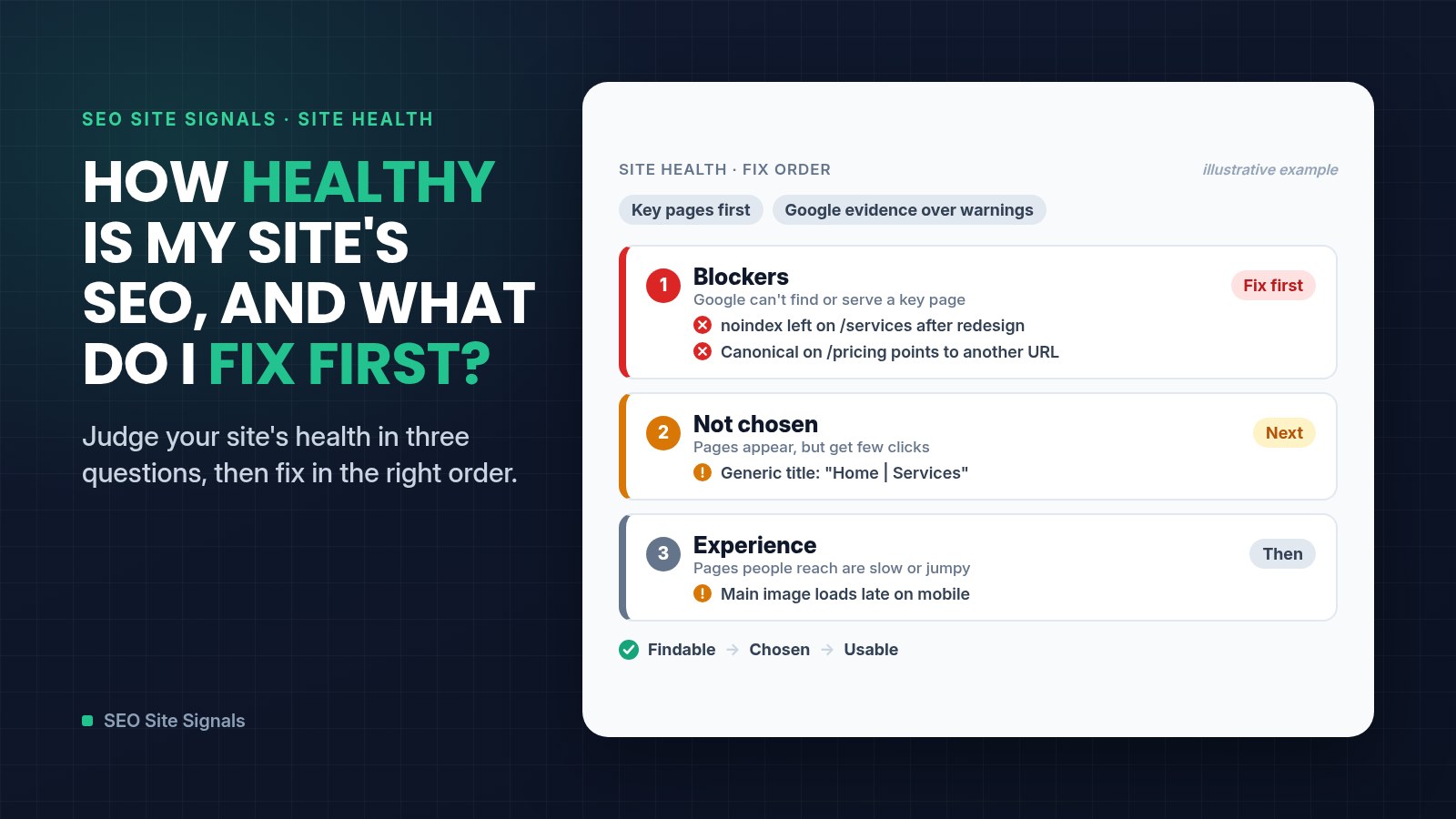
Your site's SEO is healthy when three things are true: Google can find and serve the pages that matter to your business, those pages show up for the searches your customers actually make, and people who land on them can use them without fighting the page. If the first one fails, fix it first, because nothing else counts until Google can reach and index your important pages. If the pages appear in search but nobody clicks, fix that second. Speed, layout and polish come third. A single grade from a tool does not tell you any of this on its own.
This guide is for an owner who has not run any test yet. Many people type "seo audit my site" or look for a website SEO health check at this point; what they usually need first is a way to tell what kind of problem they have, if any, and which one to deal with before the others. Every Google rule below links to its source.
How can I tell how healthy my site's SEO is?
Ask three questions in order. Each one has an answer you can see without buying anything.
1. Can Google find and serve my important pages?
Search Google for site:yourdomain.com and for the exact address of your homepage and your main service or product pages. Google's own Page indexing report help suggests these searches first for small sites, and says all of your important pages should be indexed even though most sites have a few that are not.
2. Do those pages appear for the searches that matter?
In Search Console, open the Performance report and look at the queries and pages with impressions. If your services, products and locations show up there, Google connects your site with what you do. If only your brand name appears, it does not yet.
3. Can people use the pages once they arrive?
Open your key pages on a phone. Do they load quickly, stay still while loading, and make the main content obvious? Google's page experience guidance frames this as a set of self-assessment questions: good Core Web Vitals, secure pages, content that displays well on mobile, and no intrusive interstitials.
If all three answers are yes, your site is in reasonable health, even if some tool flags dozens of minor warnings. If any answer is no, you have found your starting point. That is the honest version of an SEO health check: a short diagnosis of whether the site is findable, chosen and usable, rather than a long list of everything that could be better.
A number out of 100 is not on that list. A single grade mixes blockers with cosmetic issues, so two sites with the same number can be in very different shape. Google itself notes that trying to get a perfect score in a report "just for SEO reasons may not be the best use of your time."
What should I fix first if something looks wrong?
Fix in the order the three questions run, and within each, start with the pages that earn you money or leads.
First: anything that stops Google from reaching a key page
A stray noindex, a robots.txt rule that blocks a section, a canonical tag that points somewhere else, a key page that returns an error, or a page nothing links to. Google's guide to debugging drops in Search traffic describes these as technical issues that can prevent Google from crawling, indexing or serving your pages.
Second: pages that appear but do not get chosen
Pages with impressions and few clicks, weak or duplicated titles, or the wrong page appearing for a search. These are real problems, but only once the right pages are reachable.
Third: experience problems on pages people already reach
Slow loading, layout that jumps, hard-to-use mobile pages. Worth fixing, but a fast page that Google cannot index is still invisible. If speed is your main worry, our guide to whether a slow website is hurting your rankings covers that order on its own.
Two rules keep the order honest. Weight problems by the value of the page: a blocked contact page matters more than a blocked tag archive. And trust Google's own evidence over a tool warning: a key page Google does not show at all outranks any complaint about a page that is already indexed and earning impressions.
If you find several problems at once, do not change everything in the same week. Google's SEO Starter Guide says some changes take effect in a few hours and others take several months, and suggests waiting a few weeks to judge whether a change helped. Fix the blockers, give Google time to recrawl, then move to the next layer.
What if Google can't find or serve my important pages?
Then that is the whole job for now. A site with a blocked or unindexed service page is not healthy, however good the rest looks. The usual causes are short and checkable:
- A
noindexleft in place. Common after a redesign, when a staging setting goes live with the new site. - A robots.txt block. A rule meant for one folder that catches more than intended.
- A canonical pointing at another URL. Google may then treat your page as a duplicate and show the other one. The Page indexing help says duplicate pages are not served, and that the canonical version of every important page should be indexed.
- No way in. Google mainly finds pages through links from pages it already knows, and from sitemaps. A page with no internal links and no sitemap entry can sit unfound.
For a single page you are unsure about, our guide to checking indexing with URL Inspection shows how to confirm what Google sees. Fix the cause, request indexing for the most important page, and move on to the next question once Google can reach your key pages.
What if the site is findable, but people still don't choose it?
This is a different kind of health problem, and a common one. Your pages are indexed, Search Console shows impressions, yet clicks stay close to zero. Google's traffic guide puts it plainly: if impressions hold steady but clicks drop, you might not have the best page title and snippet, so people don't understand what your page offers, or other results look more appealing.
Look for three patterns:
- Titles that do not say what the page is. The Starter Guide says a good title is unique to the page, clear and concise, and accurately describes the contents. Generic titles like "Home" or "Services" lose the click to a competitor that names the service and the city. Our title tag guide covers how to test one before it ships.
- The wrong page showing up. A blog post appears for a search where your service page should, so people who wanted to buy land on an article.
- Results too deep to be seen. Impressions at an average position on page four or five mean you exist in the results but are rarely looked at.
Whether you are showing up at all, and for which searches, is covered in our guide to whether your website is visible on Google. Here, the point is the order: once the pages are findable, the next health question is whether they deserve the click.
When is a full-site check useful after I know the order?
Once you know which of the three problems you have, a broad test becomes far more useful, because you can read its findings against that order instead of treating every warning as urgent. That is the right way to use any seo health checker or site health checker: as evidence for the diagnosis, not as the diagnosis. A full check is most worth running at three moments:
- After a migration. Google's site move guide lists leftover
noindexor robots.txt blocks, redirects to the wrong URLs and stale sitemaps as common mistakes that can stop a new site from being indexed completely. - After a redesign, even without URL changes, because templates, titles and canonicals often change together.
- After a real traffic drop. Google's traffic guide says to check whether the drop is site-wide, a group of pages or one important page, and to look at technical issues, security issues and seasonality before changing content.
Our All-in-One SEO Test is the full check on this site. It runs more than 80 on-page, crawl and indexability, mobile, performance, security and structured-data checks against one URL and groups the findings by severity, so the blockers surface before the polish. It tests one address at a time rather than crawling your whole site, so run it on one example of each important page type: the homepage, a service or product page, an article and the contact page. Template problems repeat across every page built on that template.
If you would rather work through the basics yourself, our step-by-step guide to analyzing your own site for free walks through that routine. If you already have an SEO Site Signals report open, our guide to reading the report explains how its sections map to fixes.
Frequently asked questions
Is one number enough to know whether my SEO is healthy?
No. A single number blends blockers with minor issues, so it cannot tell you what to fix first. What a single grade really means is covered separately; use it as a summary, then read the findings behind it.
How is this different from analyzing my site step by step?
A step-by-step analysis walks through every area in turn. This diagnosis comes first and tells you which area matters most right now: reaching Google, earning the click, or the experience on the page.
What if I already have a report in front of me?
Read it against the same order, whichever tool produced it. Start with anything that blocks indexing on a key page, then titles and pages that are not chosen, then speed and layout findings.
How often should I look at this again?
Treat a full SEO health checkup as something tied to events: a migration, a redesign or a clear drop in traffic. Between those moments, a glance at Search Console's Performance and Page indexing reports tells you whether anything has shifted.
Do I need a paid tool to know what to fix first?
No. Search Console, a few site: searches and a phone are enough to answer the three questions. Paid monitoring helps when you want those signals watched for you across many pages.
If Search Console shows impressions, does that mean my SEO is healthy?
It means part of it is working. Impressions show Google is serving your pages. Health also depends on whether those are the right pages and whether people click and can use them.
Next step: if you'd like to see the three problems sorted by severity for one of your own pages, run the All-in-One SEO Test on your most important page first.
SEO Site Signals is made by PositionMySite, a North American software company with offices in Toronto and Tampa, building web software since 2009. Our in-house team designs and maintains the free speed, on-page and security checks on this site, and the monitoring dashboard behind them, so small and mid-size teams can understand what their own data says before they pay for an enterprise SEO suite.
Last updated: November 24, 2026 | Author: Paul Patrick | Sources: Search Console Help, Page indexing report; Google Search Central, Debugging drops in Google Search traffic; Google Search Central, SEO Starter Guide; Google Search Central, Understanding page experience; Google Search Central, How to move a site (all checked November 24, 2026).