
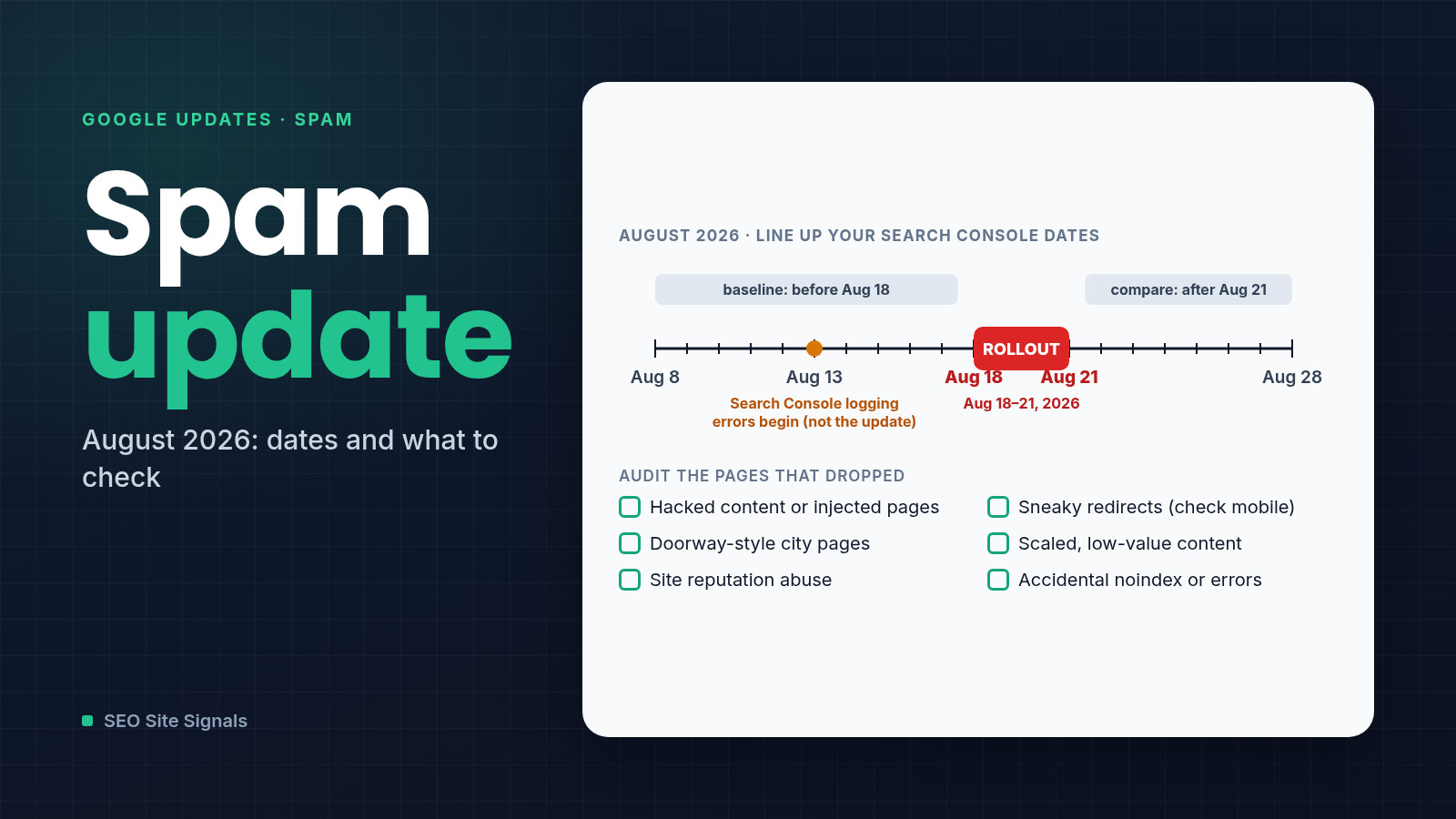
Google's August 2026 spam update started on August 18, 2026 at 9:27 a.m. PT and finished on August 21 at 1:49 a.m. PT, according to the Google Search Status Dashboard. It applied globally and to all languages. Google called it a normal spam update and announced no new policy. If your traffic moved that week, compare clean date windows before and after the rollout. Don't blame the update for the separate Search Console logging errors that started on August 13.
What was the August 2026 spam update?
The August 2026 spam update was an improvement to Google's automated spam detection systems, rolled out over about two days and sixteen hours. It was the third named spam update of 2026, after the March and June updates. Google's documentation explains that spam updates improve systems such as SpamBrain. Sites that see a change should review Google's spam policies.
August 2026 spam update
Dates (2026): Aug 18, 9:27 a.m. PT to Aug 21, 1:49 a.m. PT
What it affects: Rankings of pages that violate spam policies
Search Console Generative AI report logging error
Dates (2026): Data for Aug 13 to Aug 17
What it affects: Reported AI-feature impressions only. Google says the data was restored on Aug 21.
Search Console Discover logging error
Dates (2026): Data for Aug 13
What it affects: Reported Discover clicks and impressions only
The logging errors affected reporting, not rankings. Google's data anomalies page says each one "affects data logging only."
How do you tell whether the update affected your site?
Tell whether the update affected you by comparing a baseline that ends before August 18 with a window that starts after August 21, then looking at which pages changed rather than the site total. Spam actions usually hit specific URLs or sections, not every page equally.
- Set two windows in the Search Console Performance report: for example, July 21 to August 17 as the baseline and August 22 onward as the "after" window. Give it at least a couple of weeks of post-update data.
- Compare by page. Sort by the change in clicks and note the URLs that fell the most.
- Check whether the drop is concentrated. A group of similar pages falling while the rest holds points to a content pattern. Everything falling together points more to tracking, seasonality, or a technical change.
- Check other causes in the same period: site changes, migrations, tracking changes, and seasonal demand.
- Look for a manual action under Security & Manual Actions in Search Console. Algorithmic spam updates don't send a notice. Manual actions do.
What should you check on the pages that dropped?
Check the pages that dropped against Google's spam policies first, then rule out technical problems that make a page easy to drop. Google's policies cover practices such as cloaking, doorway pages, hacked content, hidden text, scaled content abuse, site reputation abuse, sneaky redirects, and thin affiliate pages.
- Hacked content. Injected spam pages or links are a common small-business problem. Run the domain through the Safe Browsing Test and look for URLs in Search Console you didn't create.
- Sneaky redirects. Check that pages go where visitors expect, especially on mobile. The URL Redirect Checker traces each hop.
- Doorway-style pages. Dozens of near-identical city or service pages that differ only by a place name.
- Scaled content. Large numbers of pages produced mainly to rank, whether by people, templates, or AI, with little original value.
- Third-party content on your domain. Coupon, casino, or loan sections run by someone else can fall under site reputation abuse.
Then rule out the ordinary problems: pages that now return errors, are noindexed by accident, or have a canonical pointing elsewhere. The noindex guide covers the fastest check.
How long does recovery from a spam update take?
Recovery takes time, and Google gives no fixed schedule. Its spam update documentation says making changes may help "if our automated systems learn over a period of months that the site complies with our spam policies." For link spam specifically, Google says ranking benefits that came from spammy links can't be regained after the links are discounted.
Fix the policy problem properly rather than cosmetically, then keep publishing useful pages. Watch trends over months, not days.
What should you not do after a spam update?
Avoid changes that add risk without addressing a policy issue:
- Don't treat dips in the Generative AI or Discover reports for August 13 to 17 as ranking losses. Those were logging errors.
- Don't rewrite your whole site in the first week. Diagnose the pages that dropped.
- Don't file a reconsideration request without a manual action. Those only apply to manual actions.
- Don't expect speed or technical scores to fix a spam issue. A fast page can still break a spam policy.
August 2026 spam update FAQ
When did the August 2026 spam update start and finish?
According to the Google Search Status Dashboard, it started on August 18, 2026 at 9:27 a.m. Pacific time and completed on August 21, 2026 at 1:49 a.m. Pacific time, a rollout of about two days and sixteen hours. It applied globally and to all languages.
Was the August 2026 spam update a core update?
No. It was a spam update, which improves Google's automated spam detection. Core updates are broader changes to how Google's core ranking systems assess content. Google lists both on the Search Status Dashboard, and the August 2026 spam update is listed separately from core updates.
Did the August 2026 update target link spam?
Google described it as a normal spam update and didn't announce a link spam focus or a new policy. Industry coverage at the time reported that it did not specifically target link spam. Sites should review the full list of Google's spam policies rather than one tactic.
Why did my AI impressions in Search Console drop around August 13?
Google listed a logging error that reduced reported impressions in the Generative AI performance report for data from August 13 to 17, 2026, and a separate one-day Discover error on August 13. Both affected reporting only. Google's anomalies page says the missing Generative AI data was restored on August 21.
Will I get a notice if the spam update affected my site?
No. Algorithmic spam updates don't send notifications. Only manual actions appear in Search Console's Manual Actions report. If you see no manual action and a drop that lines up with August 18 to 21, review the affected pages against Google's spam policies.
Rule out hacked content before you rewrite anything: run your domain through the Safe Browsing Test, then check the pages that dropped for redirects and injected content.
SEO Site Signals is made by PositionMySite, a North American software company with offices in Toronto and Tampa, building web software since 2009. Our own team builds the free security, crawl, and on-page checks on this site and the paid monitoring dashboard behind them. We keep the single checks free so a business owner can rule out a technical cause quickly after an update.
Last updated: September 25, 2026 | Author: David Dayan | Sources: Google Search Status Dashboard, "August 2026 spam update"; Google Search Central, "Google Search spam updates and your site"; Google Search Central, "Spam policies for Google web search"; Search Console Help, "Data anomalies in Search Console"; Search Engine Land, "Google August 2026 spam update done rolling out" (August 21, 2026).