
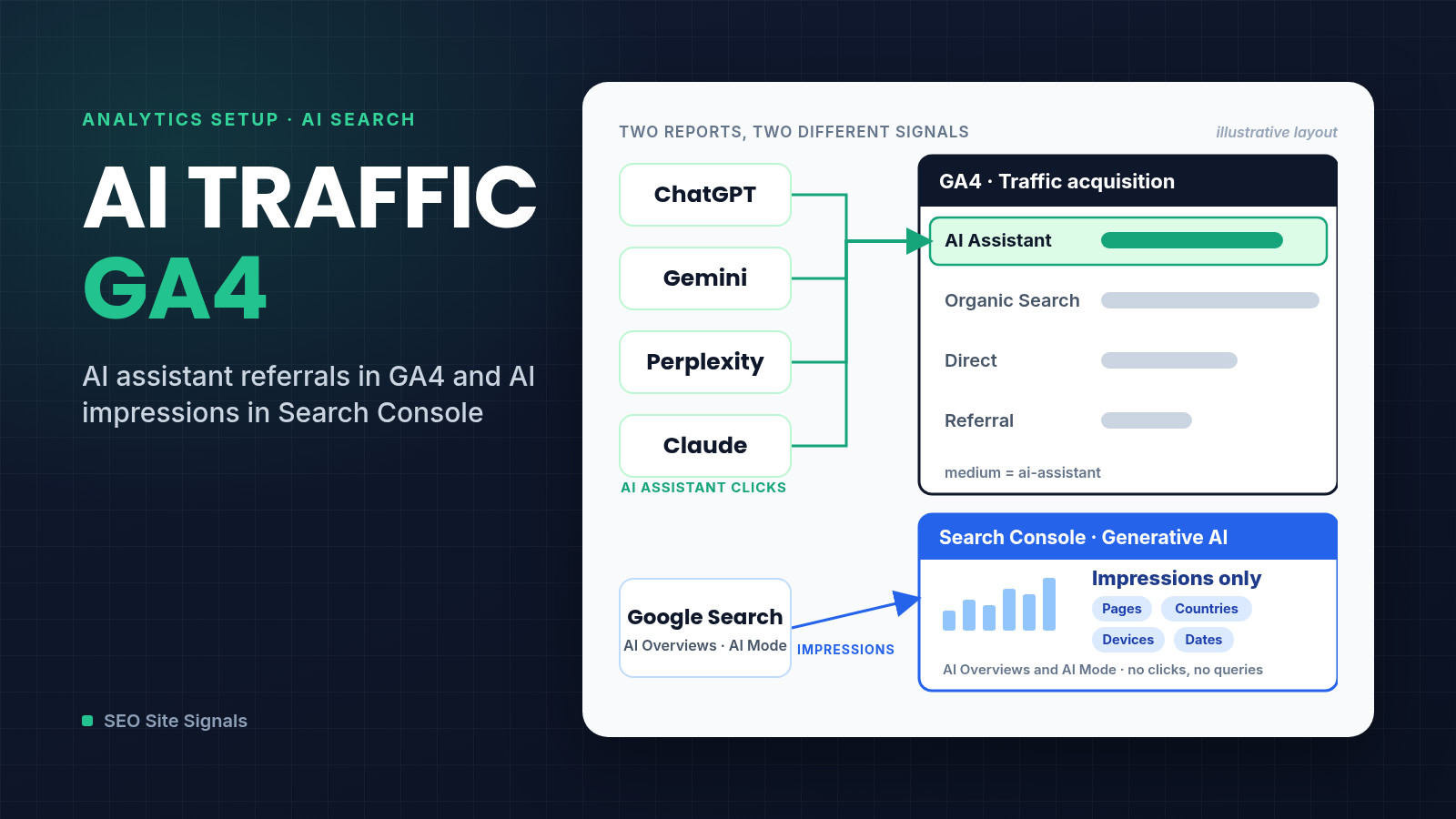
To track AI search traffic in GA4, open Reports > Acquisition > Traffic acquisition and look for the AI Assistant channel, then add a source filter or a custom channel group for anything it misses. Google's own AI features work differently: Search Console's Generative AI report shows impressions only, and GA4 counts AI Overviews and AI Mode clicks inside Organic Search. Neither report is complete, so treat AI referral traffic as a floor, not a total.
This is a free setup walkthrough for a small site: how to see ChatGPT and Gemini referrals, what the Search Console generative AI report does and does not tell you, and what to do when attribution goes missing. For conversion setup, see our GA4 key events guide. If you have not done the groundwork yet, start with the setup order.
What can you actually measure about AI search?
You can measure three separate things: visits from AI assistants (GA4), how often Google's AI features show your pages (Search Console), and how often Microsoft's AI answers cite them (Bing). No single report combines them.
GA4: AI referral traffic
Shows: sessions from ChatGPT, Gemini and other assistants, by landing page
Does not show: AI Overviews and AI Mode clicks, which GA4 files under Organic Search; visits that arrive with no referrer
Search Console: Generative AI report
Shows: impressions for AI Overviews and AI Mode, by page, country, device and date
Does not show: clicks, click-through rate, average position or queries
Bing Webmaster Tools: AI Performance
Shows: citations in Microsoft Copilot, Bing AI summaries and select partners, plus grounding queries
Does not show: clicks or traffic; Bing says the data is a sample
Google says AI Overviews and AI Mode are already counted in the Search Console Performance report under the Web search type. The new report is a separate view of the impressions part only.
How do you see AI search traffic in GA4?
To see AI search traffic in GA4, check the AI Assistant channel in the default channel group. Google added it on May 13, 2026: when a visit's referrer matches a recognized assistant, GA4 sets the medium to "ai-assistant" and the campaign to "(ai-assistant)". No configuration is needed.
- Confirm GA4 is on every template. A tag missing from your blog template means missing AI visits. The free Google Analytics test detects GA4, Tag Manager and duplicate installs.
- Open the channel report. Go to Reports > Acquisition > Traffic acquisition with a date range of at least 90 days. Look for an AI Assistant row beside Organic Search, Direct and Referral. No row means no session has matched yet.
- Break the channel into sources. Change the table's dimension to Session source / medium. Recognized visits show the medium "ai-assistant". Google's channel definition names ChatGPT, Gemini, Copilot, Grok and DeepSeek and its release note mentions Claude, but it does not publish the full recognized list.
- Add the landing page. In Explore, start a Free form exploration with Session source, Session medium and Landing page as dimensions and Sessions and Engaged sessions as metrics. Filter Session medium to exactly "ai-assistant" to see which pages assistants send people to.
- Know what it leaves out. Google's definitions say Organic Search includes AI Overviews and AI Mode, and the AI Assistant channel excludes them. You cannot split Google's AI features out of Organic Search in GA4, and the channel dates from May 2026, so do not compare it with earlier months.
How do you track ChatGPT traffic in Google Analytics?
To track ChatGPT traffic in Google Analytics, filter on the source "chatgpt.com" as well as the AI Assistant channel. OpenAI says ChatGPT search automatically adds utm_source=chatgpt.com to referral URLs, and that publishers who allow its OAI-SearchBot crawler can track those visits in Google Analytics.
- Check OAI-SearchBot first. OpenAI says to make sure you are not blocking OAI-SearchBot if you want to appear in ChatGPT summaries and snippets. The free AI crawler access test reads your robots.txt; our crawler access guide explains the results.
- Filter by source. In your exploration, filter where Session source contains "chatgpt" and compare it with the AI Assistant channel. Do not assume the two always match: check both rather than relying on one.
- Build a custom channel group for the gaps. In Admin > Data display > Channel groups, create a new group (you need Editor access), add a channel named "AI assistants" and set Source to "matches regex". A starting pattern that covers the assistants in Google's help example, plus Grok and DeepSeek:
.*(chatgpt|openai|gemini|copilot|perplexity|claude|grok|deepseek).* - Put it above Referral. Traffic goes to the first channel it matches, so drag "AI assistants" above Referral. A standard property allows 2 custom groups, and they apply to past data. Update the regex when assistants change, or traffic quietly falls back into Referral.
What does the Search Console generative AI report show?
The Search Console generative AI report shows how often your pages appeared in Google's AI Overviews and AI Mode. It reports impressions only, grouped by page, country, device and date. Google rolled it out to all websites worldwide on August 31, 2026.
What you get
Impressions for AI Overviews and AI Mode, with Pages, Countries, Devices and Dates tabs
A Web text and Web multimodal filter, a date range, and an export button for the chart and table (dates are in Pacific Time)
What you do not get
Clicks, click-through rate, average position and queries are not part of the report
Google's Search Analytics API lists only discover, googleNews, news, image, video and web as search types, with no generative AI type, so the export button is the only way out
- Open the report from your verified property. If it is missing, Google says your site may not have enough AI impressions yet, or you may have excluded it with the Search generative AI control.
- Start on the Pages tab and sort by impressions to see which URLs Google's AI features link to.
- Pair it with the Performance report for clicks, which include AI features inside the Web totals.
- Export monthly. With no API access, save a CSV each month. Google listed a logging error affecting this report for August 13 to 17 data; our spam update guide has the details.
- Match it to GA4. Rising AI impressions with flat Organic Search sessions means impressions are not turning into visits.
What does Bing Webmaster Tools add?
Bing Webmaster Tools adds an AI Performance report showing citations: how often your pages were referenced as sources in Microsoft Copilot, AI summaries in Bing and select partner experiences. Citations are not clicks, so it complements GA4 rather than replacing it.
- What it lists: total citations, cited pages, grounding queries and page-level counts, with CSV and Excel export.
- The caveat: Bing says the data is a sample, not a full log, and very low citation activity may not appear.
What should you do when AI attribution is missing?
When AI attribution is missing, assume some visits exist but are filed elsewhere, then use indirect evidence. A referrer can be dropped, so some AI clicks may land in Direct, which GA4 defines as saved links and typed URLs. Treat your AI numbers as a minimum.
- Check Direct landing pages. Few people type a deep blog URL by hand. A rise in Direct sessions to specific articles may be AI-driven. That is an inference, not proof.
- Tag links you control. Where you place a link yourself, such as in a profile or document, add UTM parameters. Never add them to internal links.
- Keep a change log. Note the date you fix robots.txt or publish a new guide, then compare the 28 days before and after.
- Pair traffic with mentions. Clicks do not show whether assistants name you; a hand-run prompt set does, as the AI visibility guide explains.
- Do not over-read small numbers. On a small site, AI referrals may be a handful of sessions. As a rule of thumb, wait a full quarter before calling a trend.
AI search traffic FAQ
Does GA4 have a built-in AI traffic report?
Yes, partly. GA4 has a default AI Assistant channel for visits from recognized assistants, visible in Traffic acquisition. It does not include Google's AI Overviews or AI Mode, which Google's channel definitions place under Organic Search. You can add a custom channel group for sources it misses.
Can I see AI Overviews clicks in GA4?
No. GA4 counts clicks from AI Overviews and AI Mode as Organic Search, with no separate label. Search Console's Generative AI report shows only impressions for those features, so you cannot isolate their clicks in either tool today.
Why don't I see any ChatGPT traffic?
There may be none yet, or it may be filed elsewhere. Check that OAI-SearchBot is not blocked, search Session source for "chatgpt", and look at Direct landing pages. A missing AI Assistant row only means no session has matched so far.
Can I pull the Search Console generative AI report with the API?
Not today. Google's Search Analytics API reference lists only discover, googleNews, news, image, video and web as search types. Use the report's export button instead, and save a copy each month so you keep your own history.
Start with the free checks: confirm every template carries GA4 with the Google Analytics test, then paste your homepage into Instant Analysis for the AI readiness checks, so any AI traffic you do get has a working path to your pages.
SEO Site Signals is the free-tool and monitoring product from PositionMySite, an in-house software company in Toronto and Tampa that has been building for the web since 2009. We write and maintain every checker in this article ourselves, so a small team can see what is broken, and what traffic is arriving, before paying for a large analytics suite.
Last updated: October 9, 2026 | Author: Steven Flemming | Sources: Search Console Help, Generative AI performance report (Search); Google Search Central Blog, Search Generative AI performance reports; Google Search Central, AI features and your website; Google Search Central, Optimizing your website for generative AI features; Search Console API, Search Analytics: query; Search Console Help, Search generative AI control; Analytics Help, Default channel group; Analytics Help, What's new in Google Analytics; Analytics Help, Custom channel groups; OpenAI Help Center, Publishers and Developers FAQ; Bing Webmaster Tools, AI Performance; Bing Webmaster Blog, Introducing AI Performance.