
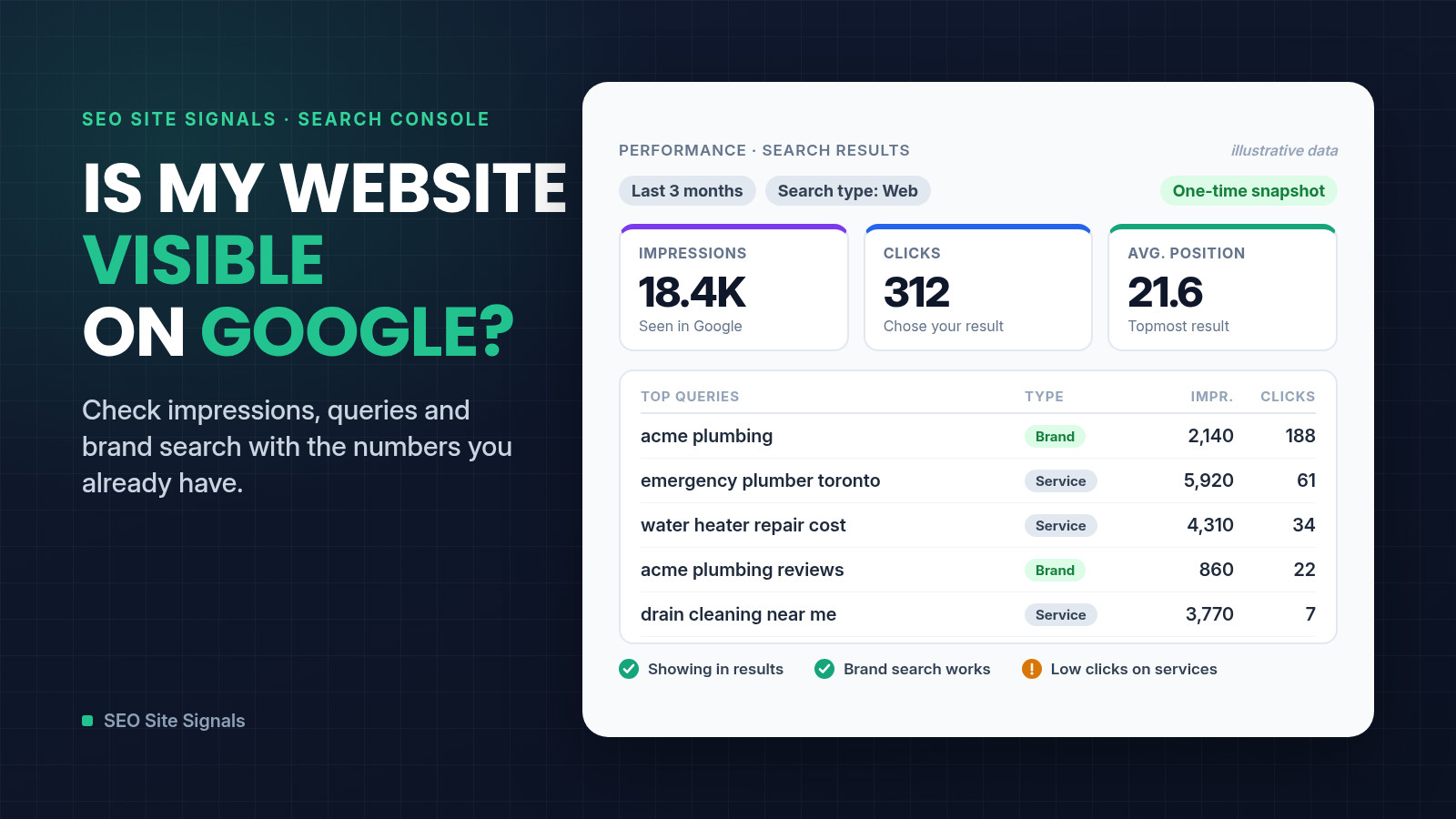
Your website is visible on Google when the Performance report in Google Search Console shows impressions for it. An impression means a link to your site appeared in Google results. The Queries list shows which searches those were, and a filter for your brand name shows whether people can find you when they look for you by name. If all three show real numbers, people are seeing your site in Google. If impressions are near zero, or only your brand name appears, your visibility is weak, even if your pages are indexed and a one-off test passes.
This guide walks through that check in one sitting, using the numbers you already have. It is a snapshot of where you stand today, not a fix-it checklist. Every Google rule below links to its source.
How can I tell if people are actually finding my site in Google?
Open Search Console, choose your property, and go to Performance > Search results. Google says this report shows "important metrics about how your site performs in Google Search results", including which queries are most likely to show your site. It is the most direct way to check website search engine visibility, because the data comes from Google itself rather than from an outside estimate.
Read three things, in this order:
- Total impressions. Is your site appearing in results at all?
- The Queries tab. Which searches is it appearing for?
- Brand queries. Does a search for your name show you?
Being in Google's index is a separate, earlier question. A page can be indexed and still get almost no impressions, because being stored is not the same as being shown. If you are not sure your pages are indexed, check that first with our guide to checking indexing and reading URL Inspection, then come back to this report.
If you have just added your site to Search Console, give it time. Google notes it can take up to a week for data to appear for a newly added site.
What do impressions in Search Console actually mean?
An impression means someone saw, or could have seen, a link to your site in Google results. Google's definition is that an impression "means that a user has seen (or potentially seen) a link to your site". For ordinary paged results, it counts when your link is on the page the person is viewing, whether or not they scroll down to it.
So impressions measure exposure, not interest. A click is a separate count: someone chose your result and landed on your site. Average position is the average rank of your highest result for those searches.
For a one-time check, look at the impressions total for the last three months, which is the report's default range, and ask three plain questions:
Zero or almost zero impressions
Google is not showing your site for real searches yet. That is a visibility problem, and it starts before titles or content. Confirm indexing first, then check that your important pages are the ones Google can reach.
Some impressions, very low average position
Your pages appear, but mostly deep in results where few people look. You are technically visible, but you are not really being found. Treat this as weak visibility, not as "I'm fine."
Steady impressions on page one or two
People are seeing you. The next questions are which searches those are and whether they turn into clicks.
This is a snapshot. Whether those numbers are rising or falling over time is a different job, with its own rules about date ranges and noise. That is covered in how to track whether your site's SEO is improving over time.
Which queries is my site showing up for?
Click the Queries tab below the chart. Each row is a search that showed your site, with its clicks, impressions and position. Sort by impressions and read the top of the list. When owners ask how to check my website visibility, this list is the real answer. It is more honest than any outside estimate, because these are searches people really typed.
On a single pass, look for three kinds of rows:
- Your name. Searches for your business or domain name. These go in the brand check below.
- What you sell, and where. Your services, products and locations, in the words a customer would use. If none of these show up, Google does not yet connect your site with what you do.
- Queries you don't recognize. Odd matches usually mean a page is being shown for a topic you never meant to target. Note them; they show how Google currently reads your pages.
Two limits from Google's About Search Console data page matter here. First, the report does not list every query: some queries made very rarely, or containing personal or sensitive information, are left out to protect privacy, and the tables show at most 1,000 rows. Second, data normally becomes available in two to three days, so the last couple of days look thin. Google also notes that even if a query appears in your list, you might not see your site when you search it yourself, because results depend on time, place, device and search history. Trust the report over a quick search on your own phone.
How do I check brand search specifically?
Add a query filter for your brand name. In the Performance report, click + Add filter, choose Query, then Queries containing, and type your brand name. Google says this match is not case-sensitive but is otherwise exact, including spaces, so enter the name the way people actually type it.
Brand names are often typed several ways: with and without a space, shortened, misspelled, or as the domain. For those, use Custom (regex). Google's filter uses RE2 syntax and matches anywhere in the query by default, so a pattern like (acme|acmeplumbing|acme plumbing) catches all three spellings at once. Then switch the filter to Queries not containing the same terms to see everything else.
Read the two views side by side:
Brand queries have impressions, and you rank near the top
People who already know you can find you. That is the floor every site needs.
Brand queries have no impressions
Either almost nobody searches your name yet, or Google does not show your site when they do. A new business may simply have no brand demand; an established one should look harder.
Brand works, everything else is close to zero
You are visible by name only. New customers who don't know you yet are not finding you through the searches that describe your business.
Keep the two groups apart whenever you judge your visibility. Brand searches come from people who already know you, so they flatter the totals.
What if I have impressions but almost no clicks?
Then you are visible but not chosen. Click-through rate is clicks divided by impressions, and a low figure usually points to one of three things: your result sits too low for people to reach it, your title and snippet don't answer what the searcher wanted, or the query doesn't really match what the page offers.
Check the queries with the most impressions and the fewest clicks. If their average position is far down, the real issue is ranking, not appeal, and the priority checklist in why a website isn't ranking on Google is the next step. If the position is decent but clicks are still rare, compare your title and description with what the query asks for, and rewrite the ones that miss.
When is a free test useful after I have the numbers?
A free test is useful once Search Console has told you where you stand, because it can explain why. It checks the condition of a page today: whether it loads over HTTPS, whether something blocks indexing, and whether the title, headings and speed hold up. It cannot tell you whether people are finding the site in Google. Only the Performance report can.
That is the honest limit of any website visibility checker that works from the outside. It can read public signals, but it cannot see the searches Google showed you for. Use a test to rule out a technical cause, for example when an important page has no impressions at all. You can run Instant Analysis on that page to look for a stray noindex tag, a blocked crawl or a broken title before you rewrite anything. To make sense of the findings, how to read an SEO Site Signals report explains each section. A report shows your site's condition, not how often Google shows it.
Frequently asked questions
If my site is in Google's index, does that mean people are finding it?
No. Indexed means Google has stored the page and can show it. Whether people see it shows up as impressions in the Performance report, and many indexed pages get very few.
What if Search Console shows no impressions at all?
First check that the property matches your real address, including https and www, since Google lists a wrong protocol as a common cause. If it does, confirm your key pages are indexed, then give new sites about a week for data to appear.
Should I trust a third-party visibility rating instead of Search Console?
Treat it as an estimate. Outside tools model rankings from their own keyword lists, while Search Console reports the searches where Google actually showed your site. When they disagree, Search Console is the record.
Why does my site show up for my brand name but I still get almost no traffic?
Because brand searches only reach people who already know you. Filter brand terms out and look at what is left: if non-brand impressions are near zero, Google isn't showing you for the searches that describe your business.
Do I need a special tool to see whether my site shows up in Google?
No. Search Console is free and holds the impressions, queries and brand data. A Google website checker that works from the outside can't see those searches; it can only test your pages' public signals.
Is my site safe, or has Google flagged it?
That is a separate question from visibility, and it is what some people mean by "google site checker": is my site on Google's list of unsafe sites?
To find out, run the free Safe Browsing test and look at the Security issues report in Search Console.
Next step: if you'd like to see how SEO Site Signals puts Search Console data and page checks side by side in one dashboard, watch the demo walkthrough.
SEO Site Signals is made by PositionMySite, a North American software company with offices in Toronto and Tampa, building web software since 2009. Our in-house team designs and maintains the free speed, on-page and security checks on this site, and the monitoring dashboard behind them, so small and mid-size teams can understand what their own data says before they pay for an enterprise SEO suite.
Last updated: November 19, 2026 | Author: Steven Flemming | Sources: Search Console Help, Performance report (Search results): Overview and basic setup; Search Console Help, What are impressions, position, and clicks?; Search Console Help, Advanced filtering and comparison; Search Console Help, About Search Console data (all checked November 19, 2026).