
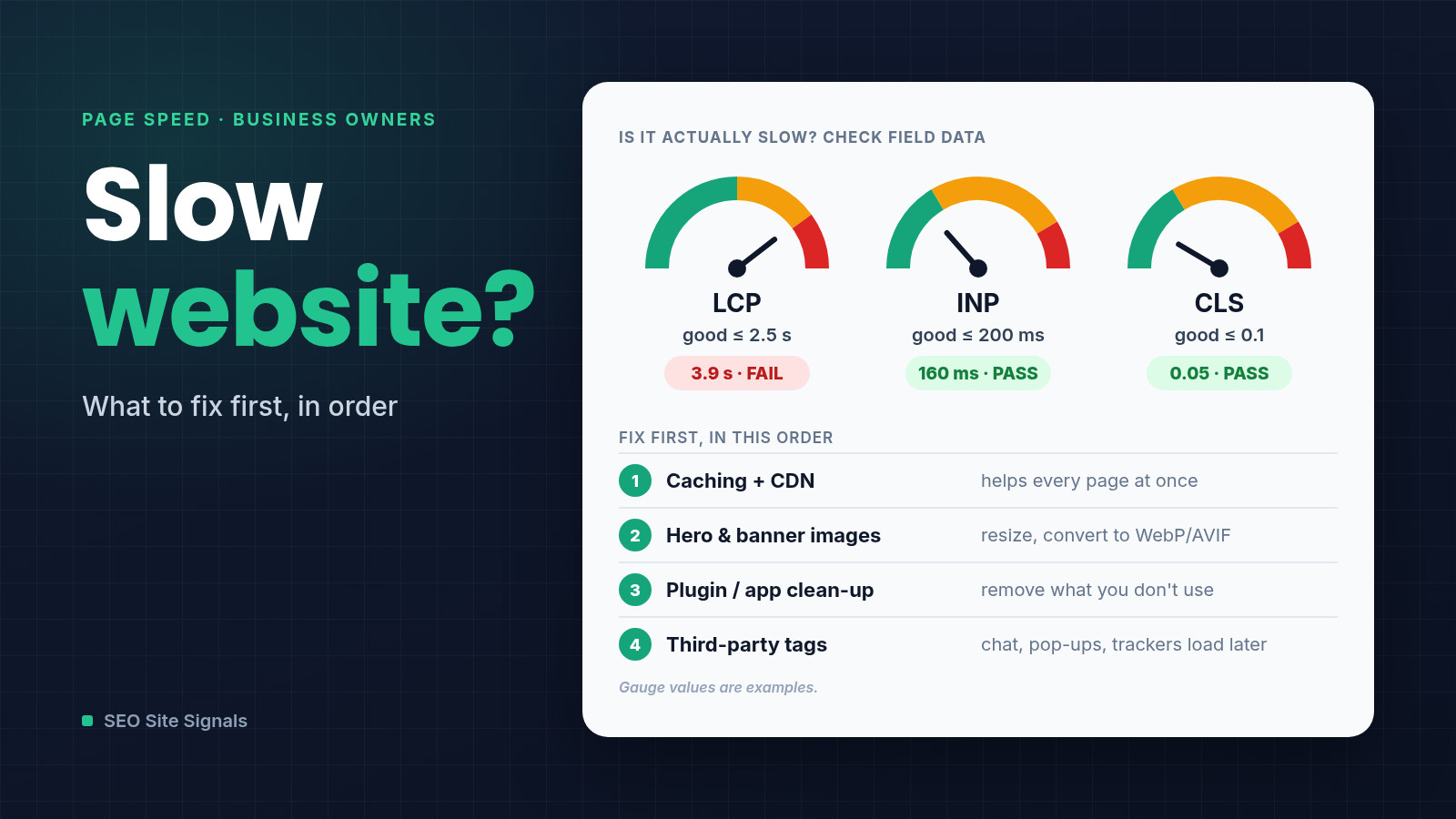
A slow website can hurt your Google rankings, but usually less than it hurts your sales. Google says good Core Web Vitals align with what its ranking systems reward, and that page experience can make the difference when several pages are equally relevant. It also says relevance comes first, so speed alone won't lift a weak page past a better one. The bigger, more certain cost of a slow site is visitors who leave before the page loads. For most small businesses, the fix is a short list: caching, images, and too many add-ons.
This guide is for owners and managers rather than developers: how to tell whether your site is actually slow, what usually causes it, what to fix first, and what to ask your developer or host.
Does site speed really affect Google rankings?
Site speed affects Google rankings through Core Web Vitals, a set of real-user measurements Google recommends site owners get right. Google's documentation says good Core Web Vitals align with what its core ranking systems reward. It also says Search "always seeks to show the most relevant content, even if the page experience is sub-par."
- Speed won't rescue a weak page. If a competitor's page answers the search better, it can outrank a faster page.
- Speed can decide close contests. When several pages are similarly helpful, a better page experience can contribute to ranking.
- Speed always affects visitors. People who give up before the page loads never become leads, whatever your ranking.
Be wary of anyone who promises a specific ranking or traffic increase from speed work. Google hasn't published figures like that, and results depend on the competition.
How can you tell whether your site is actually slow?
Test your site the way customers use it: on mobile, on the pages that bring in business, and with real-user data where Google has it. Your own experience on office Wi-Fi with a warm cache is the least reliable test.
- Run your homepage and top service or product page through the Page Speed Test. Test on mobile first.
- Open the Core Web Vitals report in Google Search Console. It shows whether real visitors' experience is rated good, needs improvement, or poor, grouped by similar pages.
- Check PageSpeed Insights for a single important URL. The top section shows real-user data if Google has enough of it.
- Look at your analytics by device. If mobile visitors leave much faster or convert much less than desktop visitors on the same pages, speed is a likely suspect.
What usually makes a small-business website slow?
Most small-business sites are slow for a handful of reasons, and they are rarely the ones owners expect. A new hosting plan is sometimes the answer, but more often the problem sits in the site itself.
No page caching
How it shows up: Every visit makes the server build the page from scratch
Typical fix: Turn on page caching in your host or CMS; the Page Cache Test shows whether it's working
Oversized images
How it shows up: Camera-size photos shown in small spaces
Typical fix: Resize, compress, and use WebP or AVIF
Too many plugins or apps
How it shows up: Each adds scripts and styles to every page
Typical fix: Remove unused ones; limit the rest to the pages that need them
Third-party widgets
How it shows up: Chat, reviews, pop-ups, social feeds, several tracking tags
Typical fix: Keep the ones that earn their place; load them after the page
Heavy themes and page builders
How it shows up: Large CSS and JavaScript even on simple pages
Typical fix: Lighter theme, or strip unused builder features
Sliders and autoplay video in the header
How it shows up: Big files that load before anything useful
Typical fix: One strong static image instead
What should you fix first?
Fix the problems that affect every page before polishing individual pages. The order below is what usually delivers the biggest improvement for the least effort on a typical small-business site.
- Caching and CDN. Make sure pages are cached and static files are served from a content delivery network. This often helps every page at once.
- Images at the top of key pages. Resize and convert the hero and banner images. The modern image format guide explains how.
- Plugin and app clean-up. Remove anything you no longer use. Every removed script is one less thing to download.
- Third-party tags. Review chat widgets, pop-ups, and tracking tags. Keep what you actually use, and have the rest load after the page appears.
- Then the detailed metrics. If Search Console still flags pages, work on the specific failing metric. The Core Web Vitals reference explains each one.
Change one thing at a time and re-test the same page, so you know what helped.
What should you ask your developer or host?
Ask specific questions tied to results you can check yourself. Vague requests to "make the site faster" tend to produce vague work. These questions get concrete answers:
- Is full-page caching turned on, and does the Page Cache Test confirm it?
- Are we using a CDN for images, CSS, and JavaScript?
- Which plugins or apps add scripts to every page, and do we need all of them?
- Is the main image on the homepage resized, converted to WebP or AVIF, and not lazy-loaded?
- Which pages does Search Console flag in the Core Web Vitals report, and what is the plan for each group?
A good developer will welcome the specifics. If the answer to every question is "upgrade hosting," get a second opinion first. Hosting helps with slow server response, but it doesn't fix oversized images or too many scripts.
Slow website FAQ
How fast should my website load?
Google's target for the main content is a Largest Contentful Paint of 2.5 seconds or less for at least 75% of visits, measured on real devices. Pages should also respond to taps within 200 milliseconds and avoid content jumping around. Those are the Core Web Vitals thresholds Google publishes.
Will upgrading my hosting make my site faster?
Only if the server itself is the bottleneck, for example when pages take a long time before anything starts loading. If the delay comes from large images, heavy themes, or many third-party scripts, a bigger hosting plan changes little. Test first, then decide.
Is my site slow because of WordPress or Shopify?
Usually not the platform itself. Speed problems on WordPress and Shopify typically come from themes, plugins or apps, large images, and third-party widgets added over time. Both platforms can run fast sites when those are kept under control.
Why is my site fast on my computer but slow in Google's report?
Your computer likely has a fast connection and cached files from earlier visits. Google's Core Web Vitals report uses data from real visitors, many on mobile phones and slower networks, visiting for the first time. That is why testing on mobile matters.
How long until speed improvements show up in Google?
A speed test shows the change immediately. Google's real-user data covers the previous 28 days, so Search Console can take up to about four weeks to reflect a fix fully. Any ranking effect, if there is one, follows after that.
Start with your two most important pages: run them through the Page Speed Test on mobile and take the results to whoever manages your site.
SEO Site Signals is built by PositionMySite, a North American software company in Toronto and Tampa that has been making web software since 2009. Our in-house team builds the free speed and site-health checks on this site and the paid monitoring dashboard that watches them over time. The free tests exist so a business owner can see what is slowing a site down before paying anyone to fix it.
Last updated: September 25, 2026 | Author: David Dayan | Sources: Google Search Central, "Understanding page experience in Google Search results"; Google Search Central, "Understanding Core Web Vitals and Google search results"; Search Console Help, "Core Web Vitals report"; web.dev, "Time to First Byte (TTFB)".