
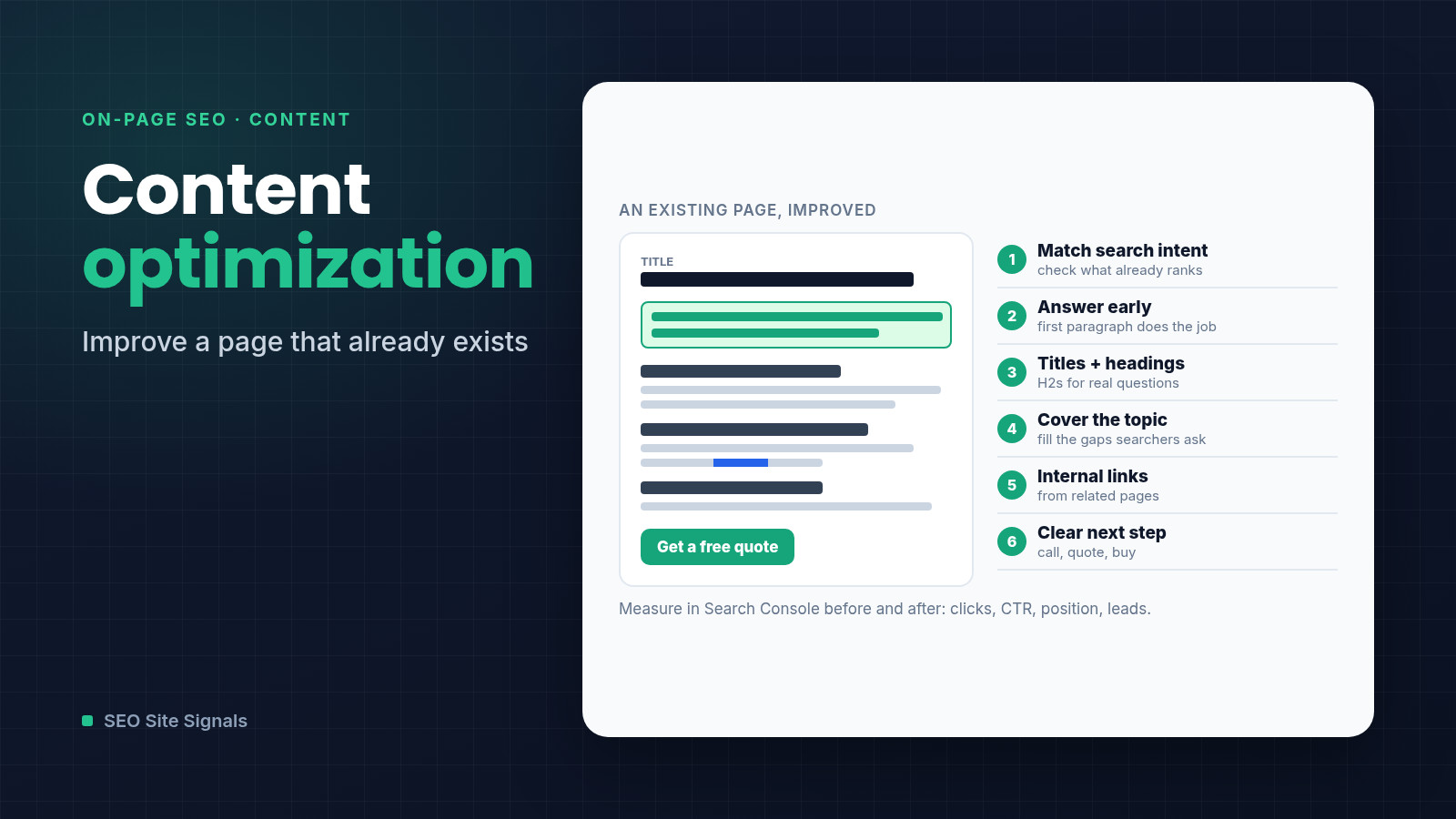
SEO content optimization means improving a page so it answers a search better than the alternatives and makes the next step obvious. Start with a page that already gets impressions in Search Console. Match it to what searchers want, answer the main question in the opening lines, tighten the title and headings, cover the follow-up questions, and add a clear call to action. Keyword density and word count are not the goal. Google has said neither is a ranking factor on its own.
This guide walks through that process for one page at a time, which is how small teams get results without rewriting the whole site.
Which pages should you optimize first?
Optimize pages that Google already shows but that don't perform, because you're improving something Google has already judged relevant. In Search Console's Performance report, look for:
- Pages with many impressions and a low click-through rate: usually a title or snippet problem.
- Pages ranking in positions 8 to 20: close enough that a better answer can move them.
- Pages with traffic but no leads or sales: a conversion problem, not a ranking one.
- Pages that have lost clicks over the past year: often outdated content or a new competitor.
How do you check search intent?
Search the main query yourself and look at what ranks. The results show what Google thinks people want: a quick answer, a step-by-step guide, a comparison, a product, or a local business. Your page needs to be the same kind of page, only better.
Know
What ranks: Guides, definitions, AI Overviews
What your page needs: A direct answer at the top, then depth
Do
What ranks: How-tos, tools, templates
What your page needs: Steps, screenshots, a way to act immediately
Compare
What ranks: Reviews, "vs" pages, lists
What your page needs: A comparison table and clear criteria
Buy or hire
What ranks: Product, service, local pages
What your page needs: Prices or ranges, proof, contact options
If your page is a sales page and the results are all guides, no amount of optimization will fix the mismatch. Create the guide and link it to the sales page instead.
How should the opening of the page work?
Answer the main question in the first 50 to 80 words. Readers decide quickly whether a page is useful, and a clear answer near the top gives search features and AI summaries a self-contained passage to work with. State the answer, the key rule or number, and who it applies to. Then explain.
Cut introductions that restate the question, talk about how "important" the topic is, or delay the answer with background.
How do you improve titles and headings?
The title is what earns the click, and headings help both readers and Google understand the structure. Google uses a page's title element, headings, and other text to create the title link shown in results.
- Put the main topic first in the title, keep it specific, and make it match the page. Check the length and preview with the Meta Title Checker.
- Use one H1 that says what the page is about.
- Make H2s real questions or clear statements, not "Overview" or "Final thoughts."
- Follow each H2 with a short answer that stands on its own, then the detail.
How do you make sure the page covers the topic?
Coverage means answering the questions a searcher has next, not repeating a phrase. Find them in Search Console queries for the page, the "People also ask" box, your customer emails, and sales calls.
- Add sections for real follow-up questions, such as costs, timelines, mistakes, and alternatives.
- Add what only you know: real prices, photos of your work, data from your own jobs, common problems you see.
- Remove sections that are outdated, off-topic, or padding.
Paste the page URL into the Free Keyword Cloud Generator to see which terms dominate. If the most frequent words are your brand, boilerplate, or navigation, the main topic may be underrepresented in the actual content. Treat it as a sanity check, not a density target.
How do internal links help an optimized page?
Internal links help Google find the page and understand what it's about, and they move readers to the next useful step. Link to the optimized page from related pages using descriptive anchor text, and link from it to the service or product it supports.
Avoid vague anchors such as "click here" or "read more." Google's link best practices recommend anchor text that describes the page you're linking to.
How do you optimize for conversions as well as rankings?
A page that ranks but doesn't lead anywhere wastes the traffic. Give every page one clear next step that matches the reader's stage.
- Guides: a related tool, checklist, or a soft link to the relevant service.
- Service pages: a phone number, a booking link, or a short form above and below the main content.
- Comparison pages: a clear recommendation and who it's for.
Add proof close to the call to action: reviews, examples of work, guarantees, and prices or ranges where you can share them.
How do you measure whether the changes worked?
Note the date you changed the page, then compare the same period before and after in Search Console: impressions, clicks, click-through rate, and average position for the page. Compare key events for the page in GA4. Give it several weeks, because Google needs to recrawl the page, and watch for seasonal changes or Google updates that affect the comparison.
Content optimization FAQ
Is there an ideal keyword density?
No. Google has warned against keyword stuffing and doesn't use a target density. Use the words your customers use, naturally, in the title, opening, and headings. Then focus on answering the question completely rather than repeating the phrase.
How long should an optimized page be?
As long as it takes to answer the query better than the pages already ranking. Google has said word count isn't a ranking factor. A quick definition can be a few hundred words, while a full guide may need 1,500 or more.
Should I change the URL when I update a page?
Usually not. Keeping the same URL keeps existing links and history. If you must change it, set up a 301 redirect from the old URL and update internal links to point at the new one.
How often should I update existing content?
Review important pages at least once a year, and sooner if facts, prices, or Google's guidance change. Update only when something is actually outdated or missing. Changing the date without changing the content doesn't help.
Does optimizing for AI answers need a different approach?
Mostly no. Google says the same SEO best practices apply to AI features in Search. Clear answers under question headings, accurate facts, and a crawlable, indexable page help with both regular results and AI summaries.
Check what your page is really about: run it through the free Free Keyword Cloud Generator and compare the top terms with the query you want to rank for. If they don't match, that's your first edit.
PositionMySite has helped businesses build and improve websites since 2009, working from Toronto and Tampa. SEO Site Signals is our free-tool product, built in-house, for small and mid-size businesses who want to fix their own pages before paying anyone to do it.
Last updated: September 25, 2026 | Author: David Dayan | Sources: Google Search Central, "Creating helpful, reliable, people-first content"; Google Search Central, "Influencing your title links"; Google Search Central, "Link best practices"; Google Search Central, "Spam policies"; Google Search Central, "AI features and your website".