
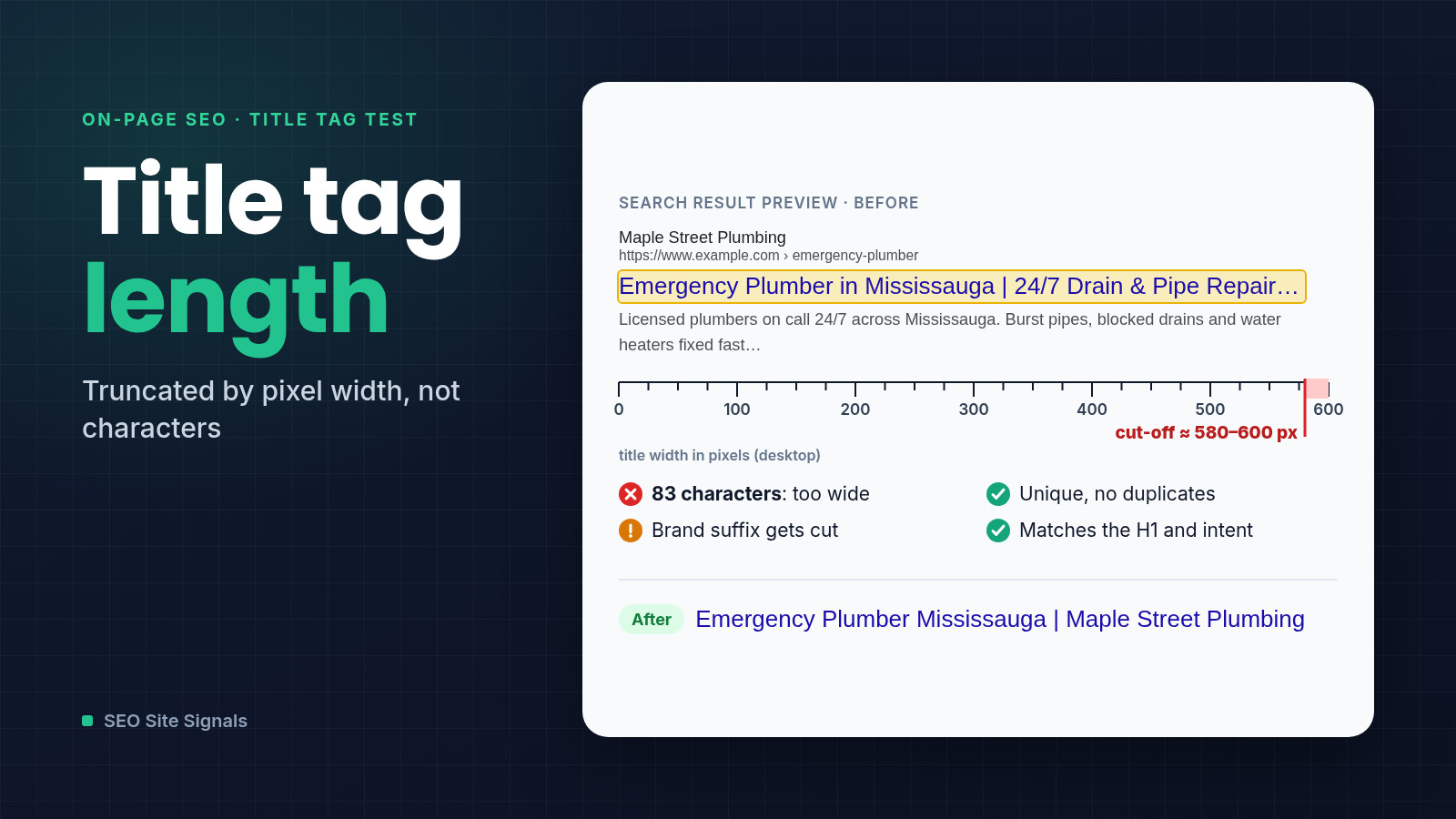
A title tag tester tells you three things before Google does: whether your <title> fits the roughly 580–600 pixels a desktop result shows, whether it duplicates another page on your site, and whether it looks like the kind of title Google rewrites. Character counts are only a proxy. If your title is cut off, repeated across templates, or buried behind a long brand suffix, you are losing clicks on rankings you already earned.
Below: how a title tag test should work, why pixels beat the 50–60 character rule, what triggers Google's rewrites, how to handle duplicates and brand names, and why expanding AI Overviews raised the stakes in late August 2026.
What does a title tag tester actually check?
A title tag tester fetches the live HTML of a URL, reads the <title> element in the <head>, and grades it against the rules that decide how it will display in search. A useful meta title checker goes past "is it under 60 characters" and looks at the things that actually cost clicks:
- Presence. Is there exactly one title tag, and is it in the head rather than injected late by a script?
- Pixel width. How wide is the title in the font Google uses, and where will it truncate on desktop and mobile?
- Keyword position. Does the phrase people search appear near the front, or after the brand and boilerplate?
- Uniqueness. Does the same title appear on other pages of the same site?
- Boilerplate. Is it a brand-only title like "Home | Acme Corp" that tells a searcher nothing?
- Title vs. H1. Does the visible main heading say the same thing, or does it contradict the title?
The last point matters. Google uses the main visual title and headings as sources for the title link, so a title that disagrees with the H1 invites a rewrite.
Why is title truncation measured in pixels, not characters?
Title truncation is measured in pixels because Google cuts the title link to fit the space available on the device, not after a fixed number of characters. Google's own documentation says there is no limit on how long a title element can be, but the title link "is truncated in Google Search results as needed, typically to fit the device width." On desktop, practitioners consistently measure that cutoff at roughly 580–600 pixels.
Characters vary a lot in width. We measured a few strings in an Arial-metric font at 20px, which is close to how desktop title links render:
30 capital "W" characters
Characters: 30
Approx. width: ~566px
Result on desktop: Already near the cutoff at half the "60 character" budget
64 lowercase "i" characters
Characters: 64
Approx. width: ~284px
Result on desktop: Fits easily despite breaking the character rule
WOOD MAPLE COUNTER TOPS - CUSTOM BUILT
Characters: 38
Approx. width: ~466px
Result on desktop: All caps costs about a third more width than the same words in lowercase (~348px)
Emergency Plumber in Mississauga | 24/7 Drain & Pipe Repair | Acme Plumbing Ltd.
Characters: 80
Approx. width: ~750px
Result on desktop: Truncated; the brand and half the service disappear
Emergency Plumber Mississauga: 24/7 Drain Repair | Acme
Characters: 55
Approx. width: ~531px
Result on desktop: Fits, with the query words first
So the 50–60 character guideline works most of the time and fails at the edges. Capitals, wide letters, and symbols such as "|" and "&" push a 55-character title over the line, while narrow text can pass 60 characters and still fit. A proper title tag test measures pixels.
How do you run a title tag test step by step?
Run a title tag test against the live, public URL, not the CMS field. Page builders, SEO plugins, and CDN rules can all change the title between the editor and the page Google fetches. Then fix the problems in order of impact: missing, duplicated, truncated, then wording.
- Test the production URL. Paste it into the Meta Title Checker. It fetches the page the way a crawler does, reads the actual title tag, and shows a SERP-style preview with the pixel width for desktop and mobile.
- Check that there is exactly one title. Two title tags, or a title that only appears after JavaScript runs, is a template bug. Fix that before you touch the wording.
- Look at the truncation point. If the preview cuts mid-word or drops the part that explains the page, shorten from the end: trim the brand suffix, then filler words like "best," "ultimate," or a stacked year.
- Move the main phrase forward. Whatever someone types to find this page should appear in the first few words. For this article that phrase is "title tag tester." For a plumber it is the service and the city.
- Compare against the page that outranks you. A competitor URL with a clearer title of similar length is a CTR problem you can fix today. The checker lets you run a competitor side by side.
- Re-test after deploy. Cached HTML and plugin overrides are the usual reasons a "fixed" title still shows the old text.
While you are in the head of the page, run the Meta Description Checker on the same URL. Title and description are read together in a result, and a strong title above an empty or duplicated description still looks unfinished.
What makes Google rewrite a title tag?
Google rewrites a title tag when it decides the title does not describe the page well, and it builds a replacement from the H1, other prominent text, anchor text, or og:title. Google's title link documentation lists the specific patterns it corrects, and nearly all of them show up on small business sites that use templates.
Half-empty title
What it looks like on a real site: "| Acme Plumbing" because the product name field was blank
Fix: Make the template fall back to the page's H1 rather than an empty string
Obsolete title
What it looks like on a real site: Title says 2025 pricing, page heading says 2026
Fix: Update the title when you update the visible date, or drop the year
Inaccurate title
What it looks like on a real site: Category page titled for a product line it no longer carries
Fix: Describe what the page contains today
Micro-boilerplate
What it looks like on a real site: Every location page titled "Our Services | Acme"
Fix: Put the distinguishing detail (city, service, model) in each title
No clear main title
What it looks like on a real site: Two headings with the same size and weight at the top of the page
Fix: Make one heading clearly the main title and match it to the title tag
Keyword stuffing
What it looks like on a real site: "Plumber, plumbers, plumbing, plumber Toronto"
Fix: Use the phrase once and add a real benefit instead
A rewrite is not a penalty, but it means Google trusted other text on the page more than your title. Search for the page and compare the title link with the title your tester reports. If they differ, work through the list above.
How should you handle duplicate titles and brand suffixes?
Every indexable URL should have its own title, and the brand should be short and at the end unless the page is your home page. Google calls out repeated and boilerplate titles directly, because identical titles make it impossible for a searcher to tell two of your pages apart when both appear for the same query.
Duplicate titles usually come from three places:
- Templates with one hard-coded title. Blog archives, location pages, and product variants that all inherit "Shop | Acme."
- Pagination and filters. Page 2, 3, and 4 of a category, or filtered views, that repeat the category title. Either add the distinguishing detail or keep those URLs out of the index.
- Staging copies and old URLs that should have been redirected or canonicalized.
For brand suffixes, Google recommends including the site name concisely, at the beginning or end of the title, separated with a hyphen, colon, or pipe. A long tagline repeated on every page wastes pixels and adds to the boilerplate problem. Google also says it may leave the site name out of the title link when it duplicates the site name already shown in the result, so a long suffix often buys you nothing. "| Acme" does the job; "| Acme Plumbing Ltd. – Toronto's Trusted Plumbers Since 1998" pushes the words that earn the click off the screen.
Does the title tag still matter when AI Overviews expand?
Yes, and arguably more. On August 27, 2026, SEO Chris Long flagged Google search results where the AI Overview loaded fully expanded, with no "Show more" button and the AI Mode "Ask anything" box open. On August 28, Google confirmed to Search Engine Roundtable that "for some queries, AI Overviews may dynamically expand for topics where our systems determine it's most useful for people." Google also said the expansion stops if the user has already started scrolling.
When that happens, the classic results sit much farther down the page. The people who do scroll past the AI answer are scanning quickly, and the title link is what they scan. A truncated, brand-first, or rewritten title is easier to skip. Nothing about the expansion changes how title links are built. It raises the cost of a weak one on the queries where you still get a blue link.
If rankings held but clicks dropped after late August, search the query on desktop. If the overview expands, test the titles of the pages that still rank before you rewrite any content.
What does a good title look like after the test?
A good title leads with the searcher's words, says what the page offers, fits the pixel limit, and ends with a short brand if there is room:
- Before: "Welcome | Acme Corp – Digital Solutions Since 2012" (brand-first, vague, and it looks the same on every page).
After: "Bookkeeping Software for Contractors | Acme" (the query first, the brand last, well under 600px). - Before: "Products | Maple Street Hardware" (on 40 category pages).
After: "Cordless Drills and Drivers | Maple Street Hardware" (unique, specific, and it matches the H1).
Keep the H1 aligned with the new title. It need not be identical, but it should describe the same page in the same words.
Title tag test FAQ
How long should a title tag be?
A title tag should fit within roughly 580–600 pixels on desktop, which usually works out to 50–60 characters of normal mixed-case text. Google sets no hard limit on title length, but it truncates the title link to fit the device, so anything past the pixel limit is cut off.
Is a meta title the same as a title tag?
Yes. "Meta title" is the common name for the HTML <title> element, even though it is not technically a meta tag. A meta title checker and a title tag tester run the same check. The og:title tag is separate and controls social previews, though Google may use it as a source.
Why does Google show a different title than the one I wrote?
Google generates the title link automatically and replaces your title when it looks empty, outdated, inaccurate, boilerplate, or stuffed, or when the page has no clear main heading. It then uses other text such as the H1 or anchor text. Fixing the underlying issue and letting Google recrawl is the only reliable fix.
Should my brand name be in every title tag?
Usually yes, but keep it short and put it at the end, separated by a pipe, hyphen, or colon. The home page is the exception where a longer brand description makes sense. Google may drop the site name from the title link if it repeats the site name already shown in the result.
How often should I run a title tag test?
Run a title tag test after every template change, CMS or SEO plugin update, and site migration, and whenever a page's clicks drop while its ranking holds. Those are the moments when titles silently change, get duplicated, or start being rewritten.
Check this page's title before your next deploy: paste the URL into the Meta Title Checker and fix whatever the pixel preview cuts off.
SEO Site Signals is built by PositionMySite, a software company based in Toronto and Tampa that has been shipping web products since 2009. Our in-house team builds the free checkers on this site, including the title tag test used in this guide, and the paid monitoring dashboard behind them. The free tools exist so small and mid-size teams can see what is wrong with a page before they commit to an enterprise SEO suite.
Last updated: September 25, 2026 | Author: David Dayan | Sources: Google Search Central, "Influencing your title links in search results"; Search Engine Roundtable, "Google AI Overviews Pushing Searchers Into AI Mode" (August 28, 2026).