
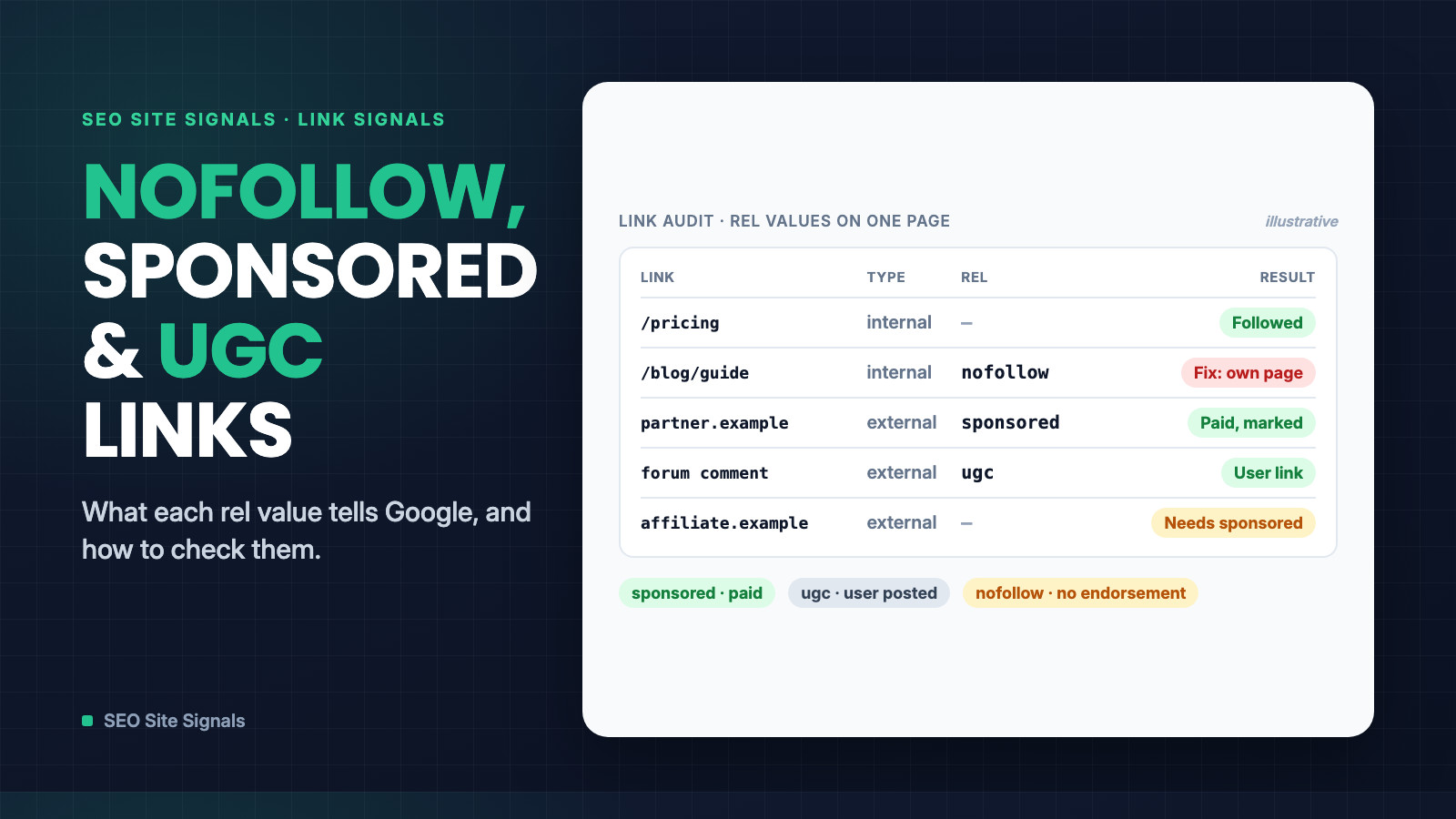
A rel value on a link tells Google what kind of link it is. rel="sponsored" says the link was paid for, rel="ugc" says a user posted it, and rel="nofollow" says you don't want to vouch for the page. Since 2019 Google treats all three as hints, not commands. A link with no rel value is a normal, endorsed link. To check a page, list every link on it with its rel value, then split them into internal and external. Most real problems show up in that split.
Most "nofollow link checker" pages stop at the list: these links are nofollow, these are not. The harder questions are which value each link should carry, which mistakes actually cost you, and what nofollow can't do. This guide covers all three, in the order you would check a real page.
What each rel value tells Google
Google's documentation on qualifying outbound links says you don't need any attribute on a link you expect Google to follow and use normally. The values exist for the links you would rather not stand behind in full.
rel="sponsored"
Use it for: ads, paid placements, affiliate links and anything else created as part of a payment or sponsorship deal.
What it tells Google: this link exists because of money, not because you chose it on merit. Google calls sponsored the preferred value here, though nofollow is still accepted.
rel="ugc"
Use it for: links in comments, forum posts, reviews and other content your users write.
What it tells Google: you didn't write or approve this link. Google suggests you can remove the value for trusted contributors with a long record of good posts.
rel="nofollow"
Use it for: links where neither value above fits and you'd rather Google not tie your site to the page, or crawl it from your page.
What it tells Google: no endorsement. It is the catch-all, not the default for every outbound link.
No rel value
Use it for: every editorial link you'd happily stand behind, internal or external.
What it tells Google: a normal link. This is what nearly all of your internal links should look like.
You can combine values. Google's 2019 announcement, Evolving "nofollow", gives rel="ugc sponsored" as a valid example and says rel="nofollow ugc" is fine if you want older systems that only know nofollow to read it too. Values can be separated by a space or a comma.
Why "hint" matters
When nofollow first appeared in 2005, Google didn't count a nofollow link as a signal at all. That changed in September 2019. Google announced that sponsored, ugc and nofollow would all be treated "as hints about which links to consider or exclude within Search," used alongside other signals. For crawling and indexing, nofollow became a hint on March 1, 2020.
In practice, that means three things.
- Nofollow doesn't hide a page. Google's documentation says linked pages "may be found through other means, such as sitemaps or links from other sites, and thus they may still be crawled." If you want a page kept out of results, it needs a
noindexrule, and Google has to be allowed to crawl it to see that rule. - Nofollow isn't for your own pages. For links inside your own site, Google points you to a robots.txt disallow rule when you need to stop crawling, not to nofollow.
- You don't need to rewrite old markup. Google says existing nofollow links on ads and sponsored placements are still supported, and to switch to sponsored "if or when it is convenient."
The one rule with a penalty behind it
Most rel choices are about clarity. Paid links are the exception. Google's spam policies say buying and selling links is a normal part of advertising, and it isn't a violation "as long as they are qualified with a rel="nofollow" or rel="sponsored" attribute value." An unmarked paid link is the case that can lead to a link scheme action.
So if you check only one thing, check every affiliate link, sponsored review, partner badge and paid directory listing on your site. Each one should carry sponsored or nofollow. The usual leaks are old guest posts, a "partners" block in the footer, and affiliate links added by hand in a page builder that skips the plugin which normally marks them.
How to check the links on a page
You can check one link in under a minute in the browser, but a real audit looks at the whole page. Work through it in this order.
- Look at the rendered page, not the editor. Many sites add rel values when the page is built, through a CMS plugin, a theme or a script. The editor can show a clean link while the live page shows
rel="nofollow", or the reverse. Right-click a link, choose Inspect, and read therelon the<a>tag. - List every link with its rel value. Viewing the page source and searching for
rel=works on a small page. For anything larger, use a checker that lists every link and its values. Our Nofollow Tag Test lists followed, nofollow, sponsored and ugc links, and separates internal links from external ones. - Split internal from external. This is where most of the useful findings are, so the next section covers it in full.
- Check page-level rules. A page can carry
<meta name="robots" content="nofollow">or anX-Robots-Tag: nofollowheader, which applies to every link on it. A link-by-link list can look clean while the whole page is nofollowed. Our noindex checker reads both the meta robots tag and the X-Robots-Tag header, and flags noindex and nofollow used together. - Re-check after any plugin or theme change. Link attributes change quietly when a template is swapped or a plugin updates its defaults.
Internal nofollow: the mistake that costs you most
An external nofollow is usually a deliberate choice. An internal nofollow is usually an accident. It tends to come from a theme or plugin that marks every link in the menu, footer or sidebar, or from an old habit of nofollowing the login, cart and contact pages to "save" ranking signal for other pages. Google has treated nofollow as a hint since 2019, and its documentation sends you to robots.txt, not nofollow, for links inside your own site. Nofollowing your own pages tells Google you don't vouch for them, which is the opposite of what you want for a service page or a blog post.
When the list comes back, sort the internal links by what they point to.
Internal links to pages you want ranked, marked nofollow
What it means: a template or plugin is marking your own navigation or body links.
Next: remove the value at the source (the theme setting or plugin rule), not link by link.
Internal links to logout, filter or session URLs, marked nofollow
What it means: someone is trying to keep crawlers off URLs that shouldn't be crawled.
Next: if those URLs really shouldn't be crawled, a robots.txt disallow rule does that more reliably. Our robots.txt checker shows what your current rules allow.
Internal links with no rel value
What it means: normal, endorsed internal links.
Next: nothing to fix. This should be almost all of them.
External links: which ones need a value
For links to other sites, the mistake runs both ways. Some sites leave paid links unmarked, and others nofollow every outbound link out of habit. Google's guidance doesn't ask you to nofollow ordinary citations. If you link to a study, a standards document or a good competitor's article because it helps the reader, a plain link is the honest signal.
Paid, affiliate or sponsored link with no rel value
What it means: the one case Google's spam policies call out.
Next: add rel="sponsored", or keep nofollow if your system already adds it.
Comment, review or forum links with no rel value
What it means: anything a visitor posts is treated as a link you endorse.
Next: mark user-posted links ugc by default, and lift it only for trusted contributors.
Every editorial citation marked nofollow
What it means: a site-wide rule is treating sources you trust like links you don't.
Next: drop the blanket rule and keep values for the links that need them.
While you are in the list of outbound links, check the ones that open in a new tab too. rel="noopener" and rel="noreferrer" share the same attribute but do a different job: they protect visitors and control referrer data, and they say nothing to Google about endorsement. Our guide to unsafe cross-origin links and noopener covers that side. Link text matters for the same links as well, and the descriptive link text test flags "click here" style anchors.
Checking whether a link to your site is followed
The same check works in reverse. If a partner, a directory or a publisher links to you, open their page and inspect the link. If it carries sponsored, ugc or nofollow, Google treats it as a hint rather than a full endorsement. That is the correct markup for a paid listing, so it isn't something to complain about. It is still worth knowing before you count the link as an editorial mention, and before you pay for a placement that was always going to be marked sponsored.
A five-minute routine for any page
- Run the page through a link checker and note how many internal links are nofollow. The target is zero, apart from deliberate cases.
- Scan the external list for anything paid or affiliate without sponsored or nofollow.
- Confirm the page has no meta robots or X-Robots-Tag nofollow you didn't mean to add.
- Check that any URL you are trying to keep out of Google uses noindex or robots.txt, not just nofollow.
- Fix the template or plugin rule that caused a pattern, then check the live page again.
Frequently asked questions
Do nofollow links help SEO at all?
Google treats nofollow, sponsored and ugc as hints, so it may still use some of what it learns from those links, such as how they are described. You shouldn't count them as endorsements, and you shouldn't remove the value from a paid link to try to get more out of it.
Should I change my old nofollow links to sponsored?
You don't have to. Google says nofollow on ads and paid links is still supported and that switching to sponsored can wait until it is convenient. Use sponsored for new paid links.
Can I use nofollow to keep a page out of Google?
No. Google says nofollowed pages may still be found and crawled through sitemaps or other links. Use a noindex rule to keep a page out of results, and robots.txt to stop crawling.
Should internal links ever be nofollow?
Rarely. Google's documentation points to robots.txt for links within your own site. Internal nofollow on pages you want ranked is almost always a template or plugin default worth removing.
Is a link with rel="noopener" a nofollow link?
No. noopener and noreferrer are security and privacy values for links that open in a new tab. They don't change how Google treats the link.
Check every link signal on your site in one pass
A rel audit is one part of how Google reads your pages. Crawl rules, noindex tags, canonicals and link text all shape the same picture. Run Instant Analysis for a full report on your site, or browse all free SEO tests to check one signal at a time.
SEO Site Signals is the free-tool and site-audit product from PositionMySite, a North American software company based in Toronto and Tampa. Since 2009 we have built checkers that show small and mid-size teams what Google sees on their pages, from crawl rules to canonicals, before they pay for another platform.
Last updated: October 27, 2026 | Author: Jay Patel | Sources: Google Search Central, Qualify your outbound links to Google; Google Search Central Blog, Evolving "nofollow": new ways to identify the nature of links (2019); Google Search Central, Spam policies for Google web search.