
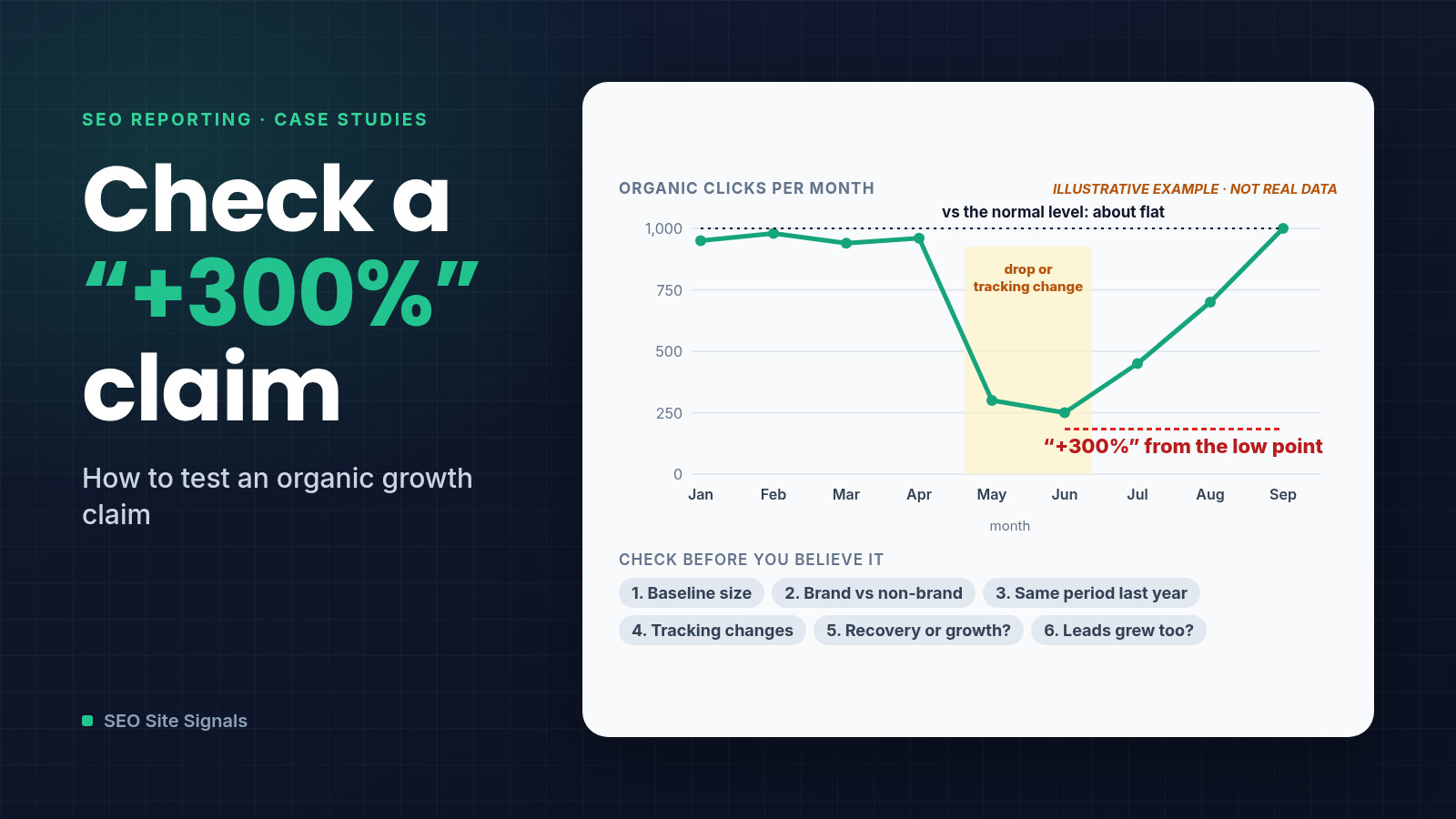
Editor's note: this post previously summarized an unnamed client case study claiming 300% organic growth in 90 days. We couldn't document those figures, so we removed them and rewrote the post around how to check claims like it.
To check a "300% organic traffic in 90 days" claim, ask five questions: what the starting baseline was, whether the growth came from brand or non-brand searches, whether it's compared with the same season last year, whether tracking changed during the period, and whether leads or sales grew too. A 300% jump from 100 visits a month is 400 visits. A jump that coincides with a new analytics setup may be a measurement change, not an SEO result.
Use the same checks on agency case studies, vendor pitches, and your own reports.
What does "300% growth" actually mean?
Start with the arithmetic. A 300% increase means four times the starting value, not three times. People often mix up "300% more" and "3x." Either way, the percentage alone tells you nothing without the starting number.
Starting organic clicks a month: 50
After a 300% increase: 200
What it tells you: Small site, possibly a recovery or first real content
Starting organic clicks a month: 2,000
After a 300% increase: 8,000
What it tells you: Meaningful, worth asking how
Starting organic clicks a month: 100,000
After a 300% increase: 400,000
What it tells you: Rare in 90 days without a major event or recovery
Always ask for the absolute numbers and the exact date ranges being compared.
Was it brand or non-brand growth?
Clicks from people searching your business name usually reflect advertising, PR, word of mouth, or seasonality, not SEO. Growth in non-brand searches, where people search for the problem or service, is the stronger sign that SEO work caused the change.
In Search Console, filter the Performance report with a query filter that excludes your brand name and its common misspellings. Compare non-brand clicks before and after. A custom regex filter lets you cover several spellings at once.
Is it compared with the right period?
Comparing a peak month with a quiet one creates growth out of nothing. A garden centre's traffic in May against February, or a tax preparer's in March against August, will look like a success story.
- Compare the same period year over year where data exists.
- Look at the full trend line, not just two points.
- Check the dates against Google's Search Status Dashboard for core or spam updates that may explain a jump or drop.
Did the tracking change?
Many dramatic before-and-after charts are measurement changes. Common causes:
- A GA4 tag installed or fixed partway through, or installed twice so everything counts double.
- A new consent banner changing how many visits are recorded.
- A Search Console property switched from one URL prefix to a domain property.
- Filters for internal or spam traffic added or removed.
Check whether the tag is present once on every page with the Google Analytics Test. For a setup checklist, see the GA4 conversion tracking guide.
Was it recovery or real growth?
If a site lost most of its traffic to a noindex, a broken migration, or a penalty, fixing it can produce huge percentage gains. That's valuable work, but it's a return to where the site was, not evidence that the same tactics will quadruple a healthy site. Look at the longer history before the "before" period.
Did leads and sales grow too?
Traffic that doesn't bring customers isn't much of a result. Ask whether organic key events in GA4, such as form submissions, calls, or purchases, grew along with clicks. Informational blog traffic from far outside your market can inflate sessions without adding a single lead.
How should you report your own SEO results honestly?
- State absolute numbers alongside percentages.
- Give exact date ranges and the comparison period.
- Separate brand and non-brand clicks.
- Note tracking changes, site changes, and Google updates during the period.
- Report business results, not just sessions.
- Name the site or get permission to share it, so the claim can be checked.
If you're planning your own 90 days, the realistic 90-day SEO plan covers what to do. This page covers how to judge the outcome.
SEO growth claims FAQ
Is 300% organic growth in 90 days realistic?
It can happen, usually from a very small or broken starting point, such as fixing a site-wide noindex or launching the first useful pages on a new site. For an established, healthy site, quadrupling organic traffic in 90 days is unusual. Ask for the baseline before judging.
What data should an agency show to support a case study?
Search Console clicks and impressions with exact dates, brand and non-brand split, a year-over-year comparison, and business results such as leads or revenue. Ideally, the client is named. Screenshots of a single percentage without context prove very little.
Why does GA4 show different organic numbers from Search Console?
They measure different things. Search Console counts clicks from Google Search results. GA4 counts sessions it can record, which depends on the tag, consent choices, and ad blockers, and includes other search engines. Compare trends within each tool rather than matching numbers between them.
How do I separate brand and non-brand traffic in Search Console?
In the Performance report, add a query filter that excludes your brand name, using "Custom (regex)" to cover variations and misspellings. Compare the filtered clicks over time. What remains shows people who found you through non-brand searches.
Should I trust percentage growth in SEO tool dashboards?
Third-party tools estimate traffic from ranking data and search volume models, not your real visits. They're useful for comparing competitors, but they can be far off. Use Search Console and GA4 for your own site's actual performance.
Make sure your own numbers are real first: run your key pages through the Google Analytics Test to confirm GA is installed once, on every page, before you compare any before-and-after figures.
SEO Site Signals is a PositionMySite product. We've been building for the web from Toronto and Tampa since 2009, and our in-house team would rather give small businesses the tools to check a claim than ask them to trust one.
Last updated: September 25, 2026 | Author: David Dayan | Sources: Search Console Help, "Performance report (Search results)"; Google Search Central, "Debugging drops in Google Search traffic"; Google Search Status Dashboard; Analytics Help, "Conversions vs. key events in Google Analytics".