
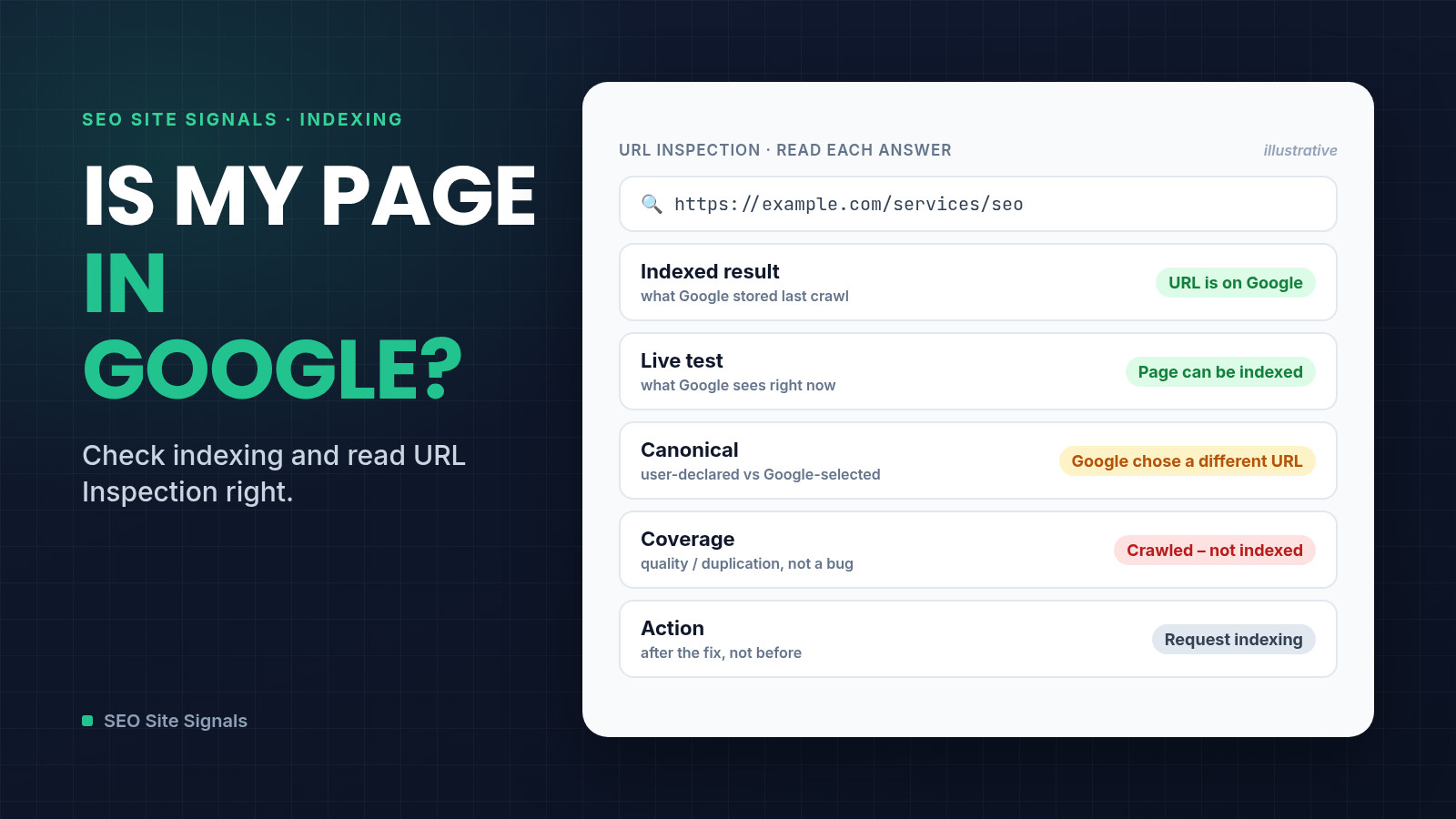
To check whether a page is in Google, open Google Search Console, paste the full URL into the URL Inspection bar at the top, and read the first line of the result. "URL is on Google" means the page is indexed and can appear in results. "URL is not on Google" means it is not indexed, and the details below that line tell you why. A site: search can hint at the answer, but only URL Inspection shows Google's own record for that one page.
Most free "URL inspection tool" pages stop at a yes or no. This guide explains how to read each part of Google's answer: the indexed result versus the live test, the canonical you declared versus the one Google picked, the two "not indexed" statuses people mix up, and when asking Google to index a page actually helps.
Why a site: search is not the answer
Typing site:example.com/page into Google is quick, and if the page shows up, it is indexed. But Google's own documentation on the site: operator says it is not guaranteed to return every indexed URL. A missing result is not proof the page is out of the index, and it tells you nothing about why. Third-party checkers that run a site: query or call an index API have the same limit: they report a result, not Google's reasoning.
URL Inspection gives you that reasoning. Google's help page describes it as a view of "information about Google's indexed version of a specific page," including whether it can be indexed, which canonical Google chose, and when it was last crawled. You need a verified Search Console property for the site, and you can only inspect URLs inside that property.
Indexed result versus live test
The first screen you see is the indexed result. It is Google's stored record from the last crawl, not the page as it is today. If you fixed something yesterday, this view may still show the old problem.
The Test live URL button fetches the page now. It tells you whether Googlebot can reach and render the current version: the HTTP status, whether robots.txt blocks it, and whether a noindex rule is present. Google is clear that a passing live test does not mean the page will be indexed. It only means nothing in the page itself blocks indexing.
Read them together:
- Indexed result fails, live test passes: you have probably already fixed the issue. Google has not recrawled yet.
- Both fail the same way: the problem is still live. Fix it before you do anything else.
- Indexed result passes, live test fails: a recent change broke the page. It will drop out at the next crawl if you leave it.
Declared canonical versus Google-selected canonical
Under Page indexing, the report shows two canonical lines. User-declared canonical is the URL your rel="canonical" tag or HTTP header points to. Google-selected canonical is the URL Google decided represents the page. Google's canonicalization docs call your tag a strong signal, not a directive. Redirects, sitemap entries, internal links and duplicate content all feed the choice.
When the two differ, the page you inspected is usually treated as a duplicate and the other URL gets indexed instead. Common causes are a canonical pointing at the wrong URL, http and https versions both resolving, trailing slash variants, or a near-identical page elsewhere on the site. Check what your tag actually says with the canonical URL checker, and confirm that old variants redirect cleanly with the redirect test.
What each URL Inspection answer means
When a page is not on Google, the Page indexing section names a reason. These are the ones you will see most when inspecting a single URL. The crawling and indexing guide covers the full site-wide list in the Page indexing report.
| Status in URL Inspection | What it means | What to check |
|---|---|---|
| URL is on Google | Indexed and eligible to appear in results. | Nothing for indexing. Rankings are a separate question. |
| Excluded by 'noindex' tag | A meta robots tag or X-Robots-Tag header told Google not to index it. | Noindex checker; see the noindex post. |
| Blocked by robots.txt | Googlebot was not allowed to crawl the URL. | robots.txt test and disallow directive test. |
| Crawled - currently not indexed | Google fetched the page and chose not to index it for now. Google's help says it may or may not be indexed later and there is no need to resubmit. | Whether the page offers something its neighbours do not. |
| Discovered - currently not indexed | Google knows the URL exists but has not crawled it yet. Google rescheduled the crawl, often to avoid overloading the site. | Internal links to it and its sitemap entry. |
| Duplicate, Google chose different canonical than user | Google indexed another URL instead of this one. | The canonical section above. |
| Page with redirect | The URL redirects, so the target is what gets indexed. | Redirect test; also check for a meta refresh redirect. |
| Not found (404) or Soft 404 | The page is missing, or it returns 200 but looks like an error page. | Custom 404 test. |
A real example: new pages waiting to be crawled
"Discovered - currently not indexed" sounds alarming, but it is often just a queue. When we checked on October 21, none of our recent posts on this blog were indexed yet; they came back as discovered or unknown to Google. The ones we spot-checked load normally and tell search engines they may be indexed. Google has simply not got to them yet. On a young or lightly linked section of a site, a gap of a few weeks is normal.
The lesson is to read the status before you act. A noindex or a robots.txt block is a fault you can fix today. "Discovered" means waiting, plus making sure the page is easy to find through internal links and a sitemap.
When requesting indexing actually helps
After you run a live test, Search Console offers Request indexing. Google's "Ask Google to recrawl your URLs" page explains what it does: it adds the URL to a priority crawl queue. It does not guarantee indexing, there is a daily quota, and requesting the same URL many times does not speed it up. A crawl can take anywhere from a few days to a few weeks.
It is worth using when:
- You just fixed a blocking problem, like removing a noindex or a robots.txt disallow, and the live test now passes.
- You published or substantially updated an important page and want Google to see it sooner.
- You changed the canonical or redirects and want the new signals read.
It will not help when the live test still fails, or when the status is "Crawled - currently not indexed" and the page has not changed. For many URLs at once, Google recommends submitting a sitemap instead of one request at a time.
A five-minute check for one page
- Inspect the exact URL in Search Console and note the status line and last crawl date.
- Run Test live URL and compare it with the indexed result.
- Compare the declared and Google-selected canonicals.
- Run the matching test from the table above to confirm the cause on the live page.
- Fix the cause, re-run the live test, then request indexing once.
Frequently asked questions
Can I check if a page is indexed without Search Console?
A site: search gives a rough signal, but Google does not guarantee it lists every indexed URL. For Google's own answer and the reason behind it, you need URL Inspection in a verified property.
Does a passing live test mean my page will be indexed?
No. It means Googlebot can fetch the page and nothing on it blocks indexing. Google still decides whether to index it.
How long does Request indexing take?
Google says recrawling can take from a few days to a few weeks, and repeated requests do not make it faster.
What is the difference between crawled and discovered, not indexed?
Crawled means Google fetched the page and chose not to index it for now. Discovered means Google knows the URL but has not fetched it yet.
Check the page causes in one pass
URL Inspection tells you what Google decided. Our free tests show what is on the live page right now: noindex rules, robots.txt blocks, canonicals, redirects and sitemap entries. Run the full scan to check them together.
Related guides: being indexed is not the same as being seen. Is my website visible on Google? shows how to read impressions and queries in Search Console, and tracking whether your SEO is improving over time covers the trend.
SEO Site Signals is the free-tool and site-audit product from PositionMySite, a North American software company based in Toronto and Tampa. Since 2009 we have built checkers that show small and mid-size teams what Google sees on their pages, from crawl rules to canonicals, before they pay for another platform.
Last updated: October 22, 2026 | Author: Bogdan Blokhin | Sources: Search Console Help, URL Inspection tool; Search Console Help, Page indexing report; Google Search Central, Ask Google to recrawl your URLs; Google Search Central, Consolidate duplicate URLs; Google Search Central, site: search operator.