
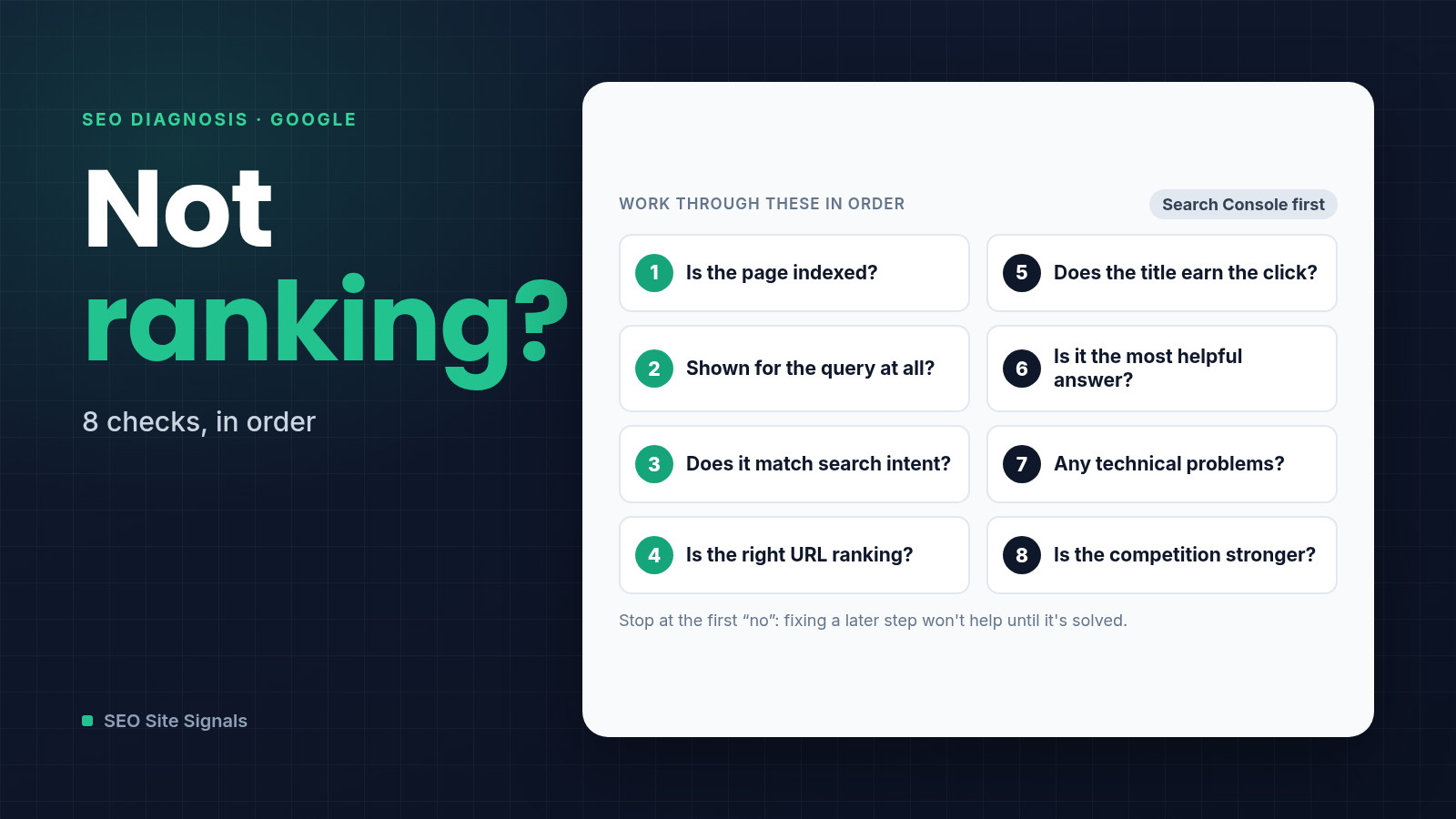
If your website isn't ranking on Google, the cause is almost always one of a few things, and checking them in the right order saves weeks of guessing. First confirm the page is indexed. Then check whether Google shows it for the search at all, whether it matches what searchers want, whether the right URL is the one ranking, and only then look at content quality, titles, speed, and links. Most "ranking problems" on small-business sites turn out to be indexing or intent problems in disguise.
This guide gives you that order, what to look at in Google Search Console at each step, and what the fix usually is.
Step 1: Is the page actually indexed?
A page can't rank if it isn't in Google's index, so check indexing before anything else. The most reliable check is the URL Inspection tool in Search Console, which tells you whether a URL is indexed and why not if it isn't.
- "URL is on Google": indexing isn't the problem. Move to step 2.
- "Excluded by 'noindex' tag": something is telling Google not to index it. The noindex guide shows how to find the source.
- "Blocked by robots.txt": Google can't crawl it. See the robots.txt guide.
- "Alternate page with proper canonical" or "Duplicate": Google chose a different URL as the main version.
- "Crawled - currently not indexed" or "Discovered - currently not indexed": Google knows the page but hasn't chosen to index it, often a quality or duplication signal.
A site: search gives a rough idea, but Google's own documentation says search operators are bound by indexing and retrieval limits and that URL Inspection is more reliable.
Step 2: Does Google show the page for the search at all?
Check whether the page earns impressions for the search you care about. In the Search Console Performance report, filter by the page and look at the queries it appears for, along with impressions and average position.
No impressions for your target query
What it means: Google doesn't consider the page relevant to it
Next step: Step 3: intent and content
Impressions, position 11 to 30
What it means: Relevant, but weaker than page one
Next step: Steps 4 to 7
Impressions, position 1 to 7, few clicks
What it means: A click-through problem, not a ranking one
Next step: Step 5: title and snippet
Impressions for other queries only
What it means: The page is about something slightly different from what you think
Next step: Rewrite toward the query, or target the query with another page
Step 3: Does the page match what searchers want?
Search for your target query and look at what ranks. Google's results show the kind of page it thinks answers the search: guides, product pages, local listings, comparisons, or tools. If page one is all local businesses with maps and your page is a national blog post, you are competing in the wrong format.
- Note the page types on page one and whether a map pack, AI Overview, or video results appear.
- Compare your page's main purpose with theirs. A service page rarely ranks for a "how to" question, and a guide rarely ranks for "near me."
- If the formats don't match, change the page or target a different query.
Step 4: Is the right page the one ranking?
When two of your pages cover similar topics, Google may alternate between them or pick the weaker one. In Search Console, filter by the query and switch to the Pages tab. More than one URL with impressions for the same query is a sign they compete.
The fix is usually to merge the pages and redirect one to the other, or to make each clearly about something different. Also check that internal links and your sitemap point to the page you want to rank.
Step 5: Does the title earn the click?
If a page ranks well but gets few clicks, look at how it appears in results. Titles that are cut off, generic, or brand-first get skipped. Google may also rewrite titles it considers boilerplate or inaccurate.
Test the title with the Meta Title Checker, which shows pixel width and a results preview. Remember that AI Overviews and other features above your listing also reduce clicks, so compare against what actually appears on the results page.
Step 6: Is the content genuinely the most helpful answer?
Google says its systems aim to reward helpful, reliable, people-first content. Its self-assessment questions are a useful checklist. Does the page provide original information, a complete answer, and something beyond what already ranks? Would someone trust it? Is it clear who wrote it and why?
- Answer the main question near the top, then cover the follow-up questions people actually have.
- Add what only you can: real prices, local details, photos of your work, first-hand experience.
- Remove thin or outdated sections that make the page look neglected.
Step 7: Are technical problems holding it back?
Technical problems rarely stop a page ranking entirely unless they block crawling or indexing, but they can hold back an otherwise good page. Check the page for broken canonicals, redirect chains, slow mobile loading, missing headings, and errors.
The All-in-One SEO Test runs 80-plus checks on one URL and ranks what to fix first. For speed specifically, the slow website guide covers what matters and what doesn't.
Step 8: Is the competition simply stronger?
Sometimes the page is fine and the competitors are stronger: more complete pages, more mentions and links from other sites, and longer track records. That is a slower problem to solve. Target more specific queries where you can be the best answer, earn links through genuinely useful pages and local relationships, and build out a group of related pages on the topic.
Website not ranking FAQ
Why is my website not showing up on Google at all?
If no page appears even for your business name, check whether the site is indexed using URL Inspection in Search Console. Common causes are a site-wide noindex left on after launch, a robots.txt block, or a brand-new site Google hasn't crawled yet. Submitting an XML sitemap in Search Console helps Google find pages.
How long does it take a new page to rank?
There is no fixed timeline. Google has to discover, crawl, and index the page, then assess it against existing results. Indexing can take days to weeks. Rankings for competitive searches can take months, especially for newer sites with few links.
Why did my rankings drop suddenly?
Check the dates against Google's Search Status Dashboard for core or spam updates, then look for changes on your side: migrations, template changes, removed content, or a new noindex. Also confirm tracking and Search Console data are accurate. Google's guide to debugging traffic drops walks through this.
Does paying for Google Ads help organic rankings?
No. Google states that it doesn't accept payment to crawl a site more often or rank it higher, and ads are sold separately from organic results. Ads can bring traffic and data about which searches convert, which can inform your SEO, but they don't move your organic position.
Should I keep adding new content if I'm not ranking?
Not before you know why existing pages don't rank. If the cause is indexing, intent mismatch, or pages competing with each other, more content can make it worse. Fix the diagnosis first, then add content where a clear gap exists.
Watch a walkthrough of this diagnosis on a real site: the SEO Site Signals demo shows the indexing, on-page, and speed checks side by side, so you can see where your own site would fall down.
SEO Site Signals is PositionMySite's free-tool and monitoring product. We are a North American software company in Toronto and Tampa, building for the web since 2009, and our in-house team builds the 80-plus checks and the dashboard used in this diagnosis. The free checks exist so small teams can find out why a page isn't ranking without buying an enterprise SEO platform first.
Last updated: September 25, 2026 | Author: David Dayan | Sources: Search Console Help, "URL Inspection tool"; Search Console Help, "Page indexing report"; Google Search Central, "Overview of Google search operators"; Google Search Central, "Creating helpful, reliable, people-first content"; Google Search Central, "Debugging drops in Google Search traffic"; Google Search Central, "In-depth guide to how Google Search works".